
Novation Launch Control 3 and Launchpad Pro Review: A Cheaper Alternative to Ableton Push 3
Mar 03, 2026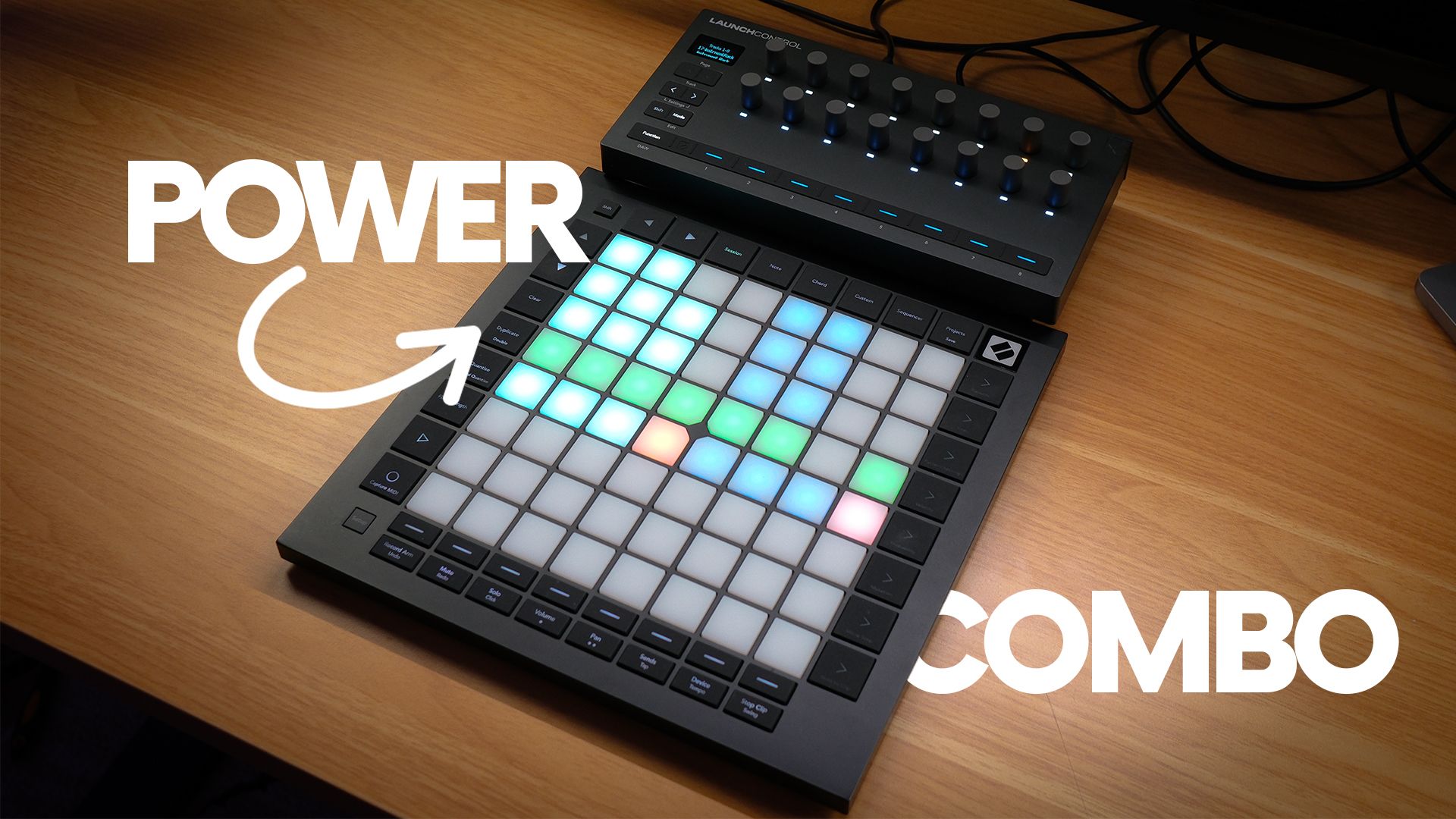
If you are looking at the Ableton Push 3 and wincing at the price, you are not alone. I get asked pretty regularly whether there is a cheaper way into hands-on Ableton Live control, and one combination keeps coming up: the Novation Launch Control XL 3 paired with the Novation Launchpad Pro MK3.
I have used both of these on and off my desk for a while now, alongside the Push 3, so this is a genuine comparison rather than a spec sheet copy and paste. Two separate controllers, doing two separate jobs, for meaningfully less money than Ableton's own hardware.
Here is whether that trade-off actually makes sense.
Quick verdict
The Launch Control XL 3 and Launchpad Pro MK3 combo is a genuinely strong cheaper alternative to the Push 3, but it is not a like-for-like replacement.
You get proper hands-on mixing, device control and clip launching across two dedicated surfaces, for less than the price of the Push 3 Standalone, and usually less than the Push 3 controller-only version too.
What you do not get is Push 3's single unified surface with its screen showing exactly what each control does, its dedicated Note mode built around Ableton's instruments, or the ability to run Ableton Live standalone with no laptop at all.
Best for: budget-conscious Ableton Live producers who want real hands-on control, anyone who prefers separate dedicated surfaces for mixing and performing rather than one shared screen, anyone who has no interest in Push 3's standalone mode.
Not ideal for: anyone who wants to ditch the laptop entirely, anyone who wants Push 3's screen telling you what every knob is doing, anyone who wants one controller instead of two.
Main reason to buy: proper Ableton Live control for meaningfully less money, split across two purpose-built devices instead of one do-everything one.
What are the Launch Control XL 3 and Launchpad Pro MK3?
These are two separate Novation controllers that happen to complement each other well if you use them together.
The Launch Control XL 3 is a mixer and device control surface. It gives you 24 endless rotary encoders across three rows, 8 faders, an OLED screen, and full-size five-pin MIDI I/O with two outputs and one input. It runs in DAW Mixer mode, DAW Control mode, or across 16 custom banks you build yourself in Novation's Components software. It does not launch clips and it has no pad grid.
The Launchpad Pro MK3 is a grid controller. It has an 8 by 8 grid of RGB pads that are pressure sensitive, so they respond to velocity and aftertouch. It runs in Session mode for launching clips and scenes, Note mode for playing melodies and chords across the grid, and it has a built-in step sequencer you can use with or without a laptop connected. It has its own five-pin MIDI I/O too, which is what lets it run in a limited standalone sequencing mode.
Individually, neither one does what the Push 3 does. Together, they cover most of the same ground, just split across two boxes instead of one.
How the two controllers work together
This is the actual point of the combo, so it is worth being specific about it.
Plug both into your laptop over USB-C and Ableton Live sees them as two independent class-compliant MIDI devices. There is no conflict and no special driver needed for either one.
In practice, the split ends up feeling a lot like how you would actually want to work. The Launchpad Pro sits in Session mode, so you are launching clips and scenes with your left hand while the pads glow to match your Live set's clip colours. The Launch Control XL 3 sits in DAW Mixer mode next to it, so your right hand is on faders and encoders for volume, pan, sends and track selection. Switch the XL 3 into DAW Control mode and the top two rows of encoders jump to whatever device is on your selected track, which is handy for tweaking a filter or a reverb without touching the trackpad.
Swap the Launchpad Pro into Note mode and you have got a genuinely playable finger drumming and melodic surface, laid out chromatically or locked to a scale, sitting right next to your mixer control.
That is the trade-off in one sentence. Push 3 gives you one surface that switches context. This combo gives you two surfaces running side by side, each doing one job well.
Setting them up with Ableton Live
Setup for both is straightforward. Plug in the Launchpad Pro over USB-C and Ableton Live recognises it automatically, no drivers required. Do the same for the Launch Control XL 3, and it shows up as its own device too.
For the Launchpad Pro, you will want to confirm it is set to Session mode when you plan to launch clips, which mirrors your Session View grid directly onto the pads, colours included. Note mode and the sequencer live behind dedicated buttons on the unit itself, so switching between performing and launching is a single button press.
For the Launch Control XL 3, DAW Mixer and DAW Control are built-in Ableton templates, so there is nothing to map manually if you are happy with the stock layout. If you want custom mappings, for hardware synths or your own control scheme, that is done through Novation's free Components app, either the desktop version or the web version, where you assign CC messages, notes and program changes across the 16 custom banks.
If you also run hardware synths, both controllers' five-pin MIDI I/O means you can route note and CC data out to outboard gear without needing a separate MIDI interface, which is a genuinely useful bonus that the Push 3 controller-only version does not offer without an adapter.
Pros compared to Ableton Push 3
Lower total cost. Even buying both controllers, you are typically spending less than the Push 3 Standalone, and often less than the Push 3 controller-only version, depending on current pricing.
Two dedicated surfaces instead of one shared one. You are not switching the same screen and pads between mixing, device control and clip launching. Each controller stays set to its job.
Proper five-pin MIDI I/O on both units. If you run hardware synths alongside Ableton Live, that is two sets of MIDI ports without needing extra interfaces.
The Launchpad Pro's built-in sequencer and pressure-sensitive pads make it a genuinely fun performance surface on its own, separate from anything to do with Live.
Cons compared to Ableton Push 3
No standalone Ableton Live. This is the biggest one. The Push 3 Standalone can run a full Ableton Live set with no laptop attached. Neither Novation controller can do that. The Launchpad Pro's onboard sequencer is a MIDI step sequencer, not Ableton Live running on the device.
No screen telling you what a control does. Push 3's display shows you device names and parameter values as you touch them. On the Launch Control XL 3 you get that on its small OLED screen, but the Launchpad Pro has no display for parameter names at all, it is pads only.
Two devices to manage instead of one. Two USB cables, two things to pack, two things to remember when you are working somewhere other than your main desk.
No dedicated MPE-style Note mode tuned specifically around Ableton's instrument set the way Push 3's Note mode is. The Launchpad Pro's Note mode is solid, but it is a more general-purpose grid layout rather than something built in lockstep with Ableton Live's own instruments.
Who should actually consider this combo instead of Push 3
If budget is the main factor and you still want real hands-on control rather than mousing around on a laptop, this combo makes a lot of sense.
If you like the idea of separate dedicated surfaces, one for mixing and device tweaks, one for performing and launching, rather than one screen and pad grid doing everything, you might actually prefer this split over Push 3's single-surface approach.
If you already run hardware synths and want proper five-pin MIDI I/O without buying a separate interface, both controllers cover that.
If you have zero interest in ever running Ableton Live without a laptop, the Push 3 Standalone's headline feature is not worth paying for, and this combo starts to look like the smarter buy.
Where I would still point people towards the Push 3 instead: if you want to write and perform sets with no laptop at all, if you want one surface with a screen that tells you exactly what you are touching, or if you specifically want Push 3's Note mode built around Ableton's own instrument browser.
Price
Pricing moves around, so check current prices before deciding, but as a rough guide the Launch Control XL 3 sits at the more affordable end of Novation's controller range, and the Launchpad Pro MK3 costs meaningfully more on its own than the XL 3 does. Bought together, the combo still typically lands below the Push 3 Standalone's price, and is competitive with, or cheaper than, the Push 3 controller-only version.
I have deliberately not quoted exact figures here because prices change and I would rather send you to check current pricing than give you a number that is wrong by the time you read this.
Final verdict
The Novation Launch Control XL 3 and Launchpad Pro MK3 combo is a genuinely good cheaper alternative to the Ableton Push 3, but only if you go in understanding what you are trading away.
You get real hands-on mixing, device control and clip launching, split across two purpose-built surfaces, for less money than Ableton's own hardware. What you give up is Push 3's standalone mode, its unified screen, and its Live-specific Note mode.
If those trade-offs do not bother you, this combo is one of the more sensible budget routes into hands-on Ableton Live control I have tested. If a laptop-free standalone workflow is the whole point for you, save up for the Push 3 instead.
If you do end up going the Push 3 route, my Ableton Push 3 course covers the standalone workflow properly, worth having whichever way you go on this one.
If you want a closer look at the Launch Control XL 3 on its own, including its OLED screen and endless encoders in more depth, I have a full Novation Launch Control XL MK3 review covering that.
If you want more reviews and Ableton production breakdowns like this one, the Push Patterns newsletter goes out every week.
Full video review:
Frequently Asked Questions
Is the Novation Launch Control XL 3 and Launchpad Pro combo cheaper than the Ableton Push 3?
Yes, buying both controllers together still comes in cheaper than the Push 3 Standalone, and is in a similar or lower bracket than the Push 3 controller on its own, depending on current pricing. Check current prices before deciding, since both brands adjust pricing over time.
Can the Launchpad Pro MK3 replace the Ableton Push 3?
Not fully. The Launchpad Pro MK3 is excellent for session view clip launching, finger drumming and its built-in sequencer, but it does not have Push 3's screen showing parameter names, and it cannot run Ableton Live standalone without a computer the way the Push 3 Standalone can.
Do the Launch Control XL 3 and Launchpad Pro work together in Ableton Live?
Yes. Both are class compliant and Ableton Live recognises them independently over USB. You can run the Launchpad Pro in Session mode for clip launching and the Launch Control XL 3 in DAW Mixer or DAW Control mode for volume, sends, pan and device parameters at the same time, with no conflicts.
Do I need two USB ports for this Novation combo?
Yes, each controller connects over its own USB-C cable and appears as a separate MIDI device. If your laptop is short on ports, a powered USB hub works fine for both.
Is the Launchpad Pro MK3 good for finger drumming?
Yes. The pads are RGB and pressure sensitive, so they respond to velocity and aftertouch, and Note mode lays out a chromatic or scale-locked grid across the 8 by 8 grid. It is a genuinely capable finger drumming and melodic performance surface, not just a clip launcher.
Who should buy the Launch Control XL 3 and Launchpad Pro instead of the Push 3?
Producers on a tighter budget who still want proper hands-on mixing and clip launching, anyone who wants separate dedicated surfaces for mixing versus performing rather than one shared screen and pad grid, and anyone who is not interested in Push 3's standalone mode and only ever plans to use Ableton Live on a laptop.
About the Author
Craig Lowe is a professional touring playback engineer and Ableton Live educator based in the UK. He teaches at ICMP, BIMM, and ThinkSpace Education and runs Push Patterns, a music production education brand at pushpatterns.com.
If you are interested in learning Ableton Live 12 or the Push 3 in a bit more detail, check the course here:
