
Logic Pro 13 Failed You, Here's Why...
Nov 09, 2026
In this article I'm going to take a look at the Logic Pro 13 update.
It's the biggest change to Logic in years, and Apple has gone all in on AI with it.
I'll cover the 4 things Apple added, what the update costs, and what Logic users have been asking for that still hasn't turned up.
Then I'll give you my honest take on whether to stick with Logic or move to Ableton Live.
There's 1 detail in the fine print that changes who gets the headline feature.
And there's a 2026 feature request poll that reads like a list of everything Apple skipped.
I'll get to both.
I started on Logic, I bought it outright in 2018, and I teach beginners both Logic and Ableton at universities across the UK.
So this is coming from someone who uses both, not from a press release.
Key Takeaways From the Logic Pro 13 Update
- Logic Pro 13 shipped on 5 November 2026 as a free update for existing owners. You need macOS 26.1 or later on an Apple silicon Mac.
- The AI assistant only comes with an Apple Creator Studio subscription. If you bought Logic outright for £199.99, you get the new Browser, the drum Stem Splitter and the Liquid Glass look, but no assistant.
- The assistant needs macOS 27 and works in US English only. It's in beta and Apple's release notes say usage limits may apply.
- Stem Splitter now splits a drum recording into 6 parts. Kick, snare, hi hat, toms, cymbals and other, each on its own track.
- The top 3 requests in the February 2026 Logic Pro Help poll were native ARA support, multiple automation lanes in the Piano Roll and a smoother waveform display. None of them are in Logic Pro 13.
- Logic's ARA support still needs Rosetta on an Apple silicon Mac. Running Logic in Rosetta switches off Stem Splitter.
What's New in Logic Pro 13
A few days ago Apple shipped what most people are calling Logic Pro 13.
Apple doesn't print the version number in its announcement, but the app says 13.0, so I'm going with it.
There are 4 main things.
First up, and it's the big one, is the assistant.
It's essentially a chatbot inside Logic that can add tracks, open plugins and adjust your levels in the mixer.
I'll get into that properly in the next section, because there's a catch.
Next up is Stem Splitter.
It's been in Logic since 2024, and it can now split drums into 6 parts.
More on that below too.
Then there's the Browser, and this one is long overdue.
It's been redesigned, and it uses something Apple calls music understanding.
It's essentially a tool on your Mac that listens to your sounds and tags them for you.
So you can search for something like heavy techno drums, or drag in a loop, and it finds sounds that match.
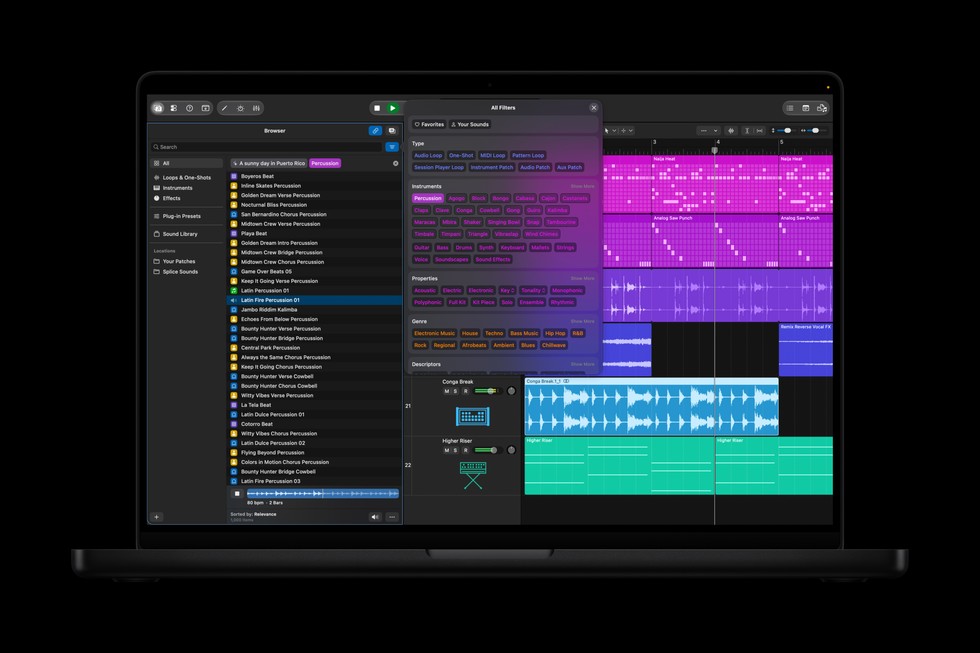
Image: Apple
It also has Splice built in.
You've seen this already in the likes of Pro Tools, Studio One and Ableton.
Copied Ableton's homework again, but a really welcome update in my opinion.
Last but not least is the look.
Logic's getting Liquid Glass, which is Apple's new design, with see through panels and a darker colour scheme.
It's essentially a reskin.
There's also a new Producer Pack from Sergio George, full of salsa and Latin jazz loops.
Now you know what's in the update.
The catch is in the next section.
Does Logic Pro 13 Have an AI Assistant and What Does It Do
Yes, and it's the headline feature.
Apple says it can help you start a new song, set up a vocal track from a single prompt, or refine a project you're already working on.
It adds tracks, loads plugins and moves faders in the mixer.
It runs on Apple's own models plus third party ones.
Apple hasn't named the third party for Logic, but it's OpenAI in Keynote and Pages, and the press are saying the same for Logic.
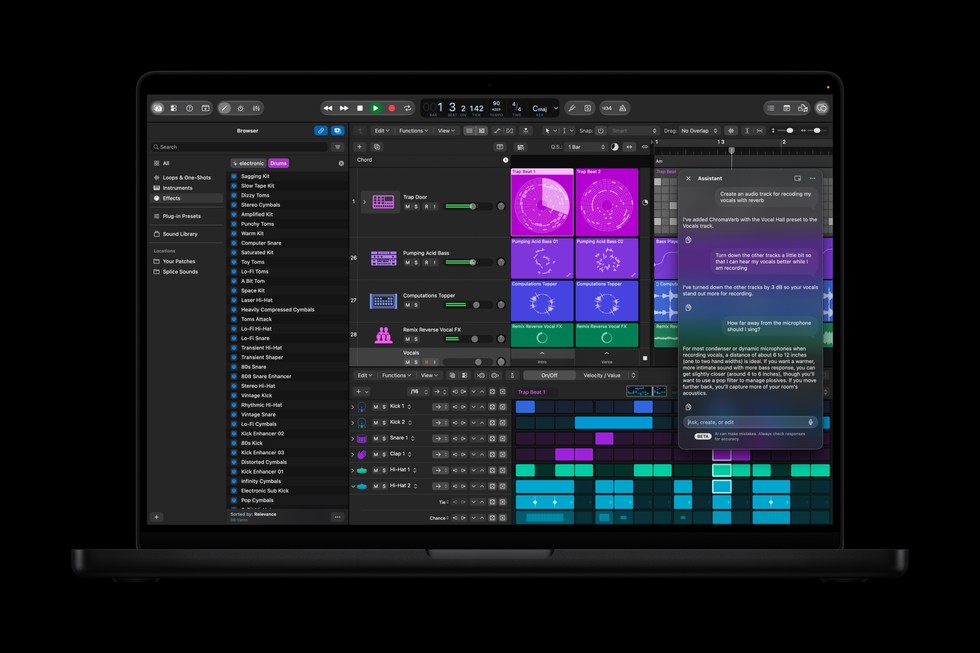
Image: Apple
Now, you're probably thinking, "So it's going to write my music for me, Craig."
Well, no.
Apple haven't gone full Suno.
From what they've shown so far, it does the admin in your DAW.
Tracks, plugins and levels.
Now, the catch.
It's in beta.
You need macOS 27 Golden Gate on an Apple Intelligence capable Mac, it only works in US English, and according to Apple's release notes for version 13.0 it requires an Apple Creator Studio subscription.
That last bit wasn't in the October announcement.
If you own Logic outright, there's no assistant in your version.
Apple's release notes also say usage limits may apply, and Apple's support documents mention expanded usage for a fee.
Personally, I feel like it skips a fundamental part of how you learn to produce music.
By doing this stuff yourself, you make happy accidents and come up with a sound you didn't intend to make.
Don't get me wrong, there are some things that are probably good for AI.
Comping drums, or setting up a session for a big recording, where you'd happily walk away from the computer for a bit.
But if you want a vocal track ready to go, Logic has had preset channel strips for years.
Load one up and your whole vocal chain is there, ready to rock and roll.
And one of the biggest problems I see with students is this.
They pile on sends without knowing what a send and return track is.
A send is essentially a way to share 1 effect, like a reverb, across lots of tracks.
Stack too many and it muddies the mix.
An assistant that sets this up for you hides that problem rather than fixing it.
Logic Pro 13 Stem Splitter Now Splits Drums Into 6 Parts
Stem Splitter has been in Logic since 2024, and it can now split a drum recording into kick, snare, hi hat, toms, cymbals and other.
Each part lands on its own track.
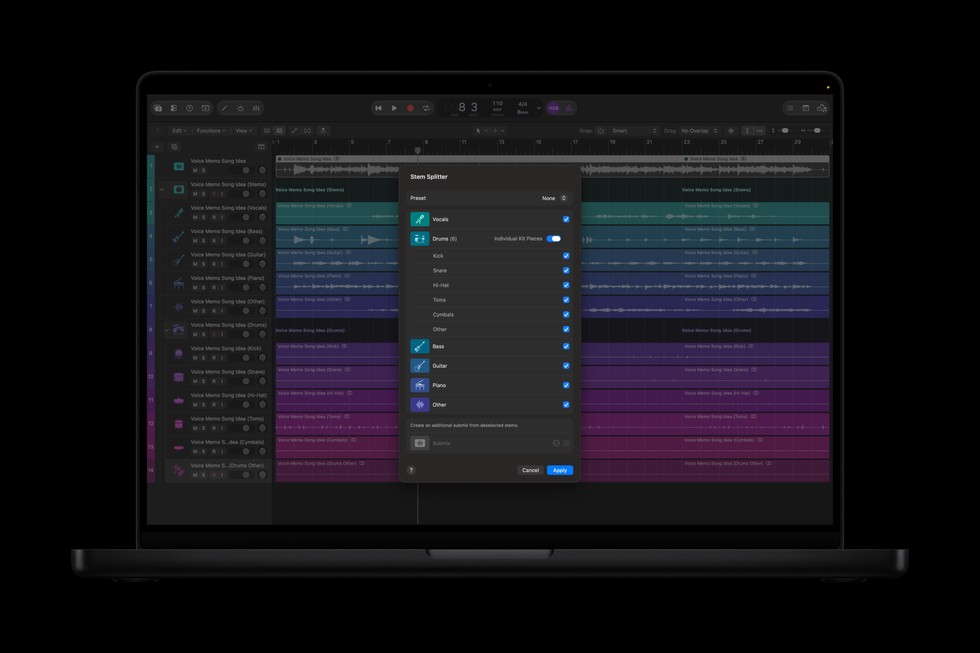
Image: Apple
Apple's line is that you can isolate, replace or rebalance drum parts without the original multitracks.
That's true, and it's a nice refinement.
I have the same problem with stem separation I've always had, though.
It's a cool party trick, but the sound quality on most separated stems isn't that great.
You can hear the artefacts.
I wouldn't use it on a release.
And to be fair, Ableton's stem separation has the same problem.
I covered what Live 12.3's stem separation does and where the artefacts creep in when it landed.
Where it earns its place is teaching.
The only time I've used stem separation is for education.
You split a track, listen to each part on its own, then rebuild it yourself.
It's a great way to learn how a record is put together.
It's handy for rough remixes too.
To be fair to Apple, Stem Splitter came to Logic first, in 2024, and we didn't get stem separation in Ableton until Live 12.3 at the end of 2025.
Good job, Apple.
Logic got there on that one.
Is the Logic Pro 13 Update Free
Yes, if you already own Logic.
Version 13.0 is on the Mac App Store now as a free update for existing owners.
If you don't own it, you've got 2 options.
You can still buy Logic Pro outright for £199.99.
Or you can get it as part of Apple Creator Studio, which is a subscription at £12.99 a month or £129.99 a year.
These are the UK prices, November 2026, by the way.
Creator Studio bundles Logic with Final Cut Pro, Pixelmator Pro, Motion, Compressor and MainStage.
The catch is the one from the last section.
The assistant is only in the subscription version.
Apple's release notes for the one time purchase version of 13.0 don't mention it at all.
You get the Browser, the drum Stem Splitter and the new look.
No assistant.
Let's be fair to Apple on the money, though.
I bought Logic back in 2018, and I've had every update since then for free.
That's 8 years of updates for £199.99, which is great value.
In that same time, I've paid for 3 Ableton updates.
If you're weighing that up, I've laid out every current Ableton Live price in UK pounds, including what an upgrade costs.
So if you're asking whether Logic is good value, it still is.
The question is what Apple wants for the subscription, and that's where the AI push comes from.
When Apple announced this update, they said the assistant is going to "change the game for how people interact with and learn to use these apps."
That's a sentence written for new customers.
What Logic Pro Users Have Been Asking For
Back in February 2026, there was a feature request poll on the Logic Pro Help forum.
131 members voted, and the idea was to show the results to Apple.
The top request was native ARA support, with 72 votes.
If you don't already know, ARA is what lets a plugin like Melodyne sit inside your audio region, so you can edit the pitch without playing the audio into the plugin first.
It gives the DAW the ability to edit audio or MIDI in a third party plugin in real time.
Logic does support ARA.
The problem is, on an Apple silicon Mac you have to open Logic in Rosetta to use Melodyne that way.
And in Rosetta, you lose Stem Splitter.
You see ARA running natively on the likes of Cubase, Studio One and Pro Tools.
To be fair, Ableton doesn't have ARA at all.
But why Logic still needs Rosetta for this, I do not know.
Next was multiple automation lanes in the Piano Roll, with 70 votes.
Right now you can only see 1 automation lane at a time while you edit your notes.
Then a smoother waveform display, with 58.
After that came better Flex Pitch, a custom colour palette, and a new browser with all your plugins and favourites in one place.
The new Browser might help with that last one.
It does pull plugin presets into the same place as loops and patches.
And then there's Live Loops.
It came out in 2020, and if you've tried it, you'll know it's kind of bad.
There are still no follow actions.
Follow actions are essentially what tell a clip what to do when it finishes, so you can chain clips together.
In Ableton, that's how you build a performance.
It's not only the poll.
In the comments under other videos on this update, people are asking for ghost notes in the Piano Roll, and an effects rack like Ableton's Audio Effect Rack.
If you've not used one, I've explained what Ableton racks are and why they end up in every set I build.
None of that is in what Apple shipped.
Which leads me on to the bigger problem.
Why Logic Pro Keeps Copying Other DAWs
So, when did things start going wrong?
Take someone who started on Logic 8 or Logic 9.
It felt aimed at audio engineers and studio professionals.
When Logic X came out, Apple changed the way it looked and made it look more like GarageBand, and a lot of Logic users kind of disengaged with it.
If you look at what's happened since, there's a pattern.
Logic has kind of lost its way, and it feels like it's copying other DAWs' homework to acquire more users rather than listening to its core user base.
Live Loops came to Logic in 2020.
Ableton has had Session View since the very first version.
Splice is in Logic now, after Pro Tools, Studio One and Ableton.
The assistant arrives after FL Studio's Gopher, which did the same thing in July 2026.
And earlier this year Apple acquired Samplab, an audio to MIDI tool.
Ableton has had audio to MIDI since Live 9, back in 2013.
To be fair, Samplab did more than that, like changing single notes inside a recording.
So why is Apple doing this?
At the end of the day it's a business.
I think they're trying to pick off other people's audiences, acquire new users and sell some nice shiny new Macs.
They're doing that rather than listening to the people already using Logic.
And the subscription is the other half of it.
Logic is now part of Apple Creator Studio.
The assistant is the reason to subscribe.
It's the one feature you can't buy outright.
Personally, I think they should have kept all this AI stuff separate from Logic Pro and made it more of a GarageBand thing.
Keep Logic Pro for the studio engineers who guaranteed do not want this in there.
Reason being, when you try to serve everyone, you end up serving no one.
Logic Pro vs Ableton Live 12 After the Logic Pro 13 Update
And this is where I have to be honest, because Logic isn't all bad.
I'm definitely team Ableton, so take this with that in mind.
But here's what Logic still does better.
The updates have been free for 8 years on a £199.99 purchase.
I've paid for 3 Ableton upgrades in that time.
Stem Splitter got there first.
And when Apple copied Ableton's homework, they didn't always fail.
I made a whole video on 2 things Logic does better than Ableton, and Quick Sampler is another one.
In my opinion it's better than Ableton's Simpler for a number of reasons.
You can record straight to pads through Drum Machine Designer, it gets rid of the silence for you, and it's generally a better user experience.
Now here's what Ableton Live 12 does better, and why I'm still here.
If you've never opened it, I've written a plain English guide to what Ableton Live is and how it's laid out, which makes the rest of this comparison easier to follow.
Session View has follow actions, so clips chain together and a jam turns into a performance.
Live Loops still can't do that 6 years in.
Max for Live is essentially a way to build your own devices inside Ableton, and there's a massive community sharing them.
So when Logic can't do something, you wait for Apple.
When Ableton can't do something, you build it, or someone already has.
And now there's Extensions.
It's in public beta, and it's essentially a way to build your own tools inside Live Suite.
I built a media player for my course with it.
Right click in the set and it's there.
Ableton also has a public beta and a public feature request forum.
So you can see what's coming, and you can ask for things.
On AI, I think Ableton is doing it the right way so far.
The AI that is in Live, like stem separation in 12.3, sits in a menu you open when you want it.
And the open source sort of vibe Ableton has always had with Max for Live means the community builds the tools, and you choose which ones to use.
That's the difference.
Apple's assistant does the work for you, and you never learn how.
Vibe coding uses the same AI to build the tool that was missing, so you can do the work yourself.
Why I Switched From Logic Pro to Ableton Live
As I said, I started on Logic.
Back then it was Logic 8.
The reason I moved came down to 1 thing.
Workflow.
I think that's the only reason we have so many different DAWs.
They all do the same thing, MIDI and audio.
That's it, essentially.
The difference is how well they help you create and edit music.
And Logic 8 wasn't cutting it for me.
It was taking me a lot longer to get ideas down, and I was feeling uninspired and unengaged.
Getting into sampling was a bit of a nightmare.
Then one day I was scrolling YouTube and found a Four Tet video.
It was a 10 minute beat challenge.
Him, Ableton, 1 vinyl, and 10 minutes to make a track from scratch.
I watched it, downloaded the free trial of Ableton.
The rest is history.
That 10 minute challenge is still how I teach sampling, and I've broken the Four Tet sampling trick down step by step for Ableton.
What kept me there was Max for Live.
Every time I hit a wall, someone had already built the thing to get over it.
And now with Extensions, I can build it myself.
That's the bit the Logic Pro 13 update gets backwards for me.
An assistant that sets up your session is solving a problem I didn't have.
A way to build the tool Apple never shipped is the problem I did have.
Should You Stick With Logic Pro 13 or Switch to Ableton Live
My verdict.
The Logic Pro 13 update could be useful if you're starting out and you've got the subscription.
For everyone else, the big question is whether you can turn it off.
From what Apple has published so far, we don't know.
From the comments I've seen, a lot of people are saying, "I hope you can turn this off."
They need to include that option, because there are going to be a lot of people who don't want this.
And if you can't turn it off, is it going to affect the performance of the DAW?
That's the question I'd want answered before I updated a working rig.
If you own Logic outright, none of this touches you yet.
You get the Browser and the drum Stem Splitter, and the assistant isn't in your version anyway.
So, if the AI stuff stays out of your way, stick with Logic.
It's still £199.99 for a lifetime of free updates.
If the things you've been asking for keep not turning up, that's your sign.
Ableton has a public beta and a public feature request forum, so you can see what's coming and ask for what isn't.
Or you can build the thing yourself with Max for Live and Extensions, like I did.
If you do make the jump, I teach the whole of Ableton Live 12 in order in my Ableton Live 12 course, so you're not starting from a blank Session View on your own.
And if you are thinking about switching from Logic to Ableton after all this, I've made a whole video on how to move from Logic Pro to Ableton Live, from the perspective of a Logic user.
You can see my opinions in a bit more detail in the YouTube video below.
Frequently Asked Questions About Logic Pro 13
When did Logic Pro 13 come out?
Apple announced the update on 27 October 2026 as part of a wider Apple Creator Studio update, and Logic Pro 13.0 landed on the Mac App Store on 5 November 2026.
Apple doesn't print a version number anywhere in its announcement.
The app itself reports 13.0, which is why everyone is calling it Logic Pro 13.
It was the first of the Creator Studio apps to get its November update, with Final Cut Pro and the rest following over the month.
Does the Logic Pro 13 assistant work on Logic Pro for iPad?
No.
The assistant is Mac only, in beta, and needs macOS 27 on an Apple Intelligence capable Mac.
Logic Pro for iPad gets the Liquid Glass redesign in this update but no assistant.
Worth knowing as well that Logic Pro for iPad is now only available through an Apple Creator Studio subscription for new customers.
If you already had the iPad app on its own subscription, that still works, but the Mac is where the AI stuff lives for now.
Which AI models power the Logic Pro 13 assistant?
Apple's announcement says the Logic assistant runs on a combination of Apple built models and third party models, and it doesn't name the third party.
In the same announcement, Apple says the assistants in Keynote, Pages and Numbers are built on Apple models and OpenAI.
Apple's Creator Studio support page lists OpenAI and Google Cloud as third party providers across the suite.
So the honest answer is Apple hasn't said which one Logic uses.
Most of the press are reporting OpenAI.
Can you turn off the AI assistant in Logic Pro 13?
Nobody knows yet.
Apple hasn't published anything about switching the assistant off, and the comments under every video on this update are full of people asking the same question.
If you bought Logic outright you don't need to worry, because the assistant isn't in your version.
For subscribers, the thing I'd want to know is whether it affects performance when you're not using it.
Until Apple answers that, I wouldn't update a rig I rely on for gigs.
Are there usage limits on the Logic Pro 13 assistant?
According to Apple's release notes, the assistant is a beta and usage limits may apply.
Apple Creator Studio already caps its other intelligence features, like image generation in Pages and Keynote, at a monthly allowance, and you can see your usage from the Intelligence Features menu in those apps.
Logic doesn't show a usage counter yet.
Apple's support document says expanded usage is available for a fee.
So budget for the assistant the way you'd budget for any cloud service, because that's what it is.
Is there a free trial of Logic Pro 13?
Yes, 2 ways.
Apple Creator Studio has a 30 day free trial, and because Logic Pro 13 is in the bundle you can download it and try the full thing, assistant included, before paying £12.99 a month.
Apple also still has a trial page for the standalone Mac version of Logic Pro, so check the current trial length there if you'd rather test the one time purchase version.
Either way, you can try the drum Stem Splitter and the new Browser before you spend anything.
Does Logic Pro 13 run on Intel Macs?
No.
Logic Pro 13 needs macOS 26.1 or later on an Apple silicon Mac, and the assistant needs macOS 27 on top of that.
If you're on an Intel Mac, your current version of Logic carries on working, you won't get the 13.0 update.
Apple has been moving its pro apps to Apple silicon only for a while, and this update is where Logic makes the cut.
If you've been holding off on a new Mac, this is the update that forces the decision.
Is Logic Pro's Stem Splitter better than Ableton's stem separation?
They have the same problem.
Both leave audible artefacts on separated stems, so I wouldn't put either on a release.
Logic's Stem Splitter has been around since 2024, splits a mix into vocals, drums, bass, guitar, piano and other, and in 13 breaks the drums down further into kick, snare, hi hat, toms, cymbals and other.
Ableton's stem separation arrived in Live 12.3 at the end of 2025 and splits a clip into vocals, drums, bass and other.
For teaching and rough remixes, both do the job.
Logic's drum split is the more detailed tool right now.
Is Logic Pro worth it in 2026?
If you want a one time purchase, yes.
£199.99 for the full DAW with free updates is the best value deal in music software, and I say that as someone who left Logic for Ableton.
The question gets harder with the subscription.
£12.99 a month gets you the assistant, Final Cut Pro, Pixelmator Pro, Motion, Compressor and MainStage, which is great value if you use 2 or more of them.
If Logic is the only one you'd open, buy it outright.
Is Logic Pro better than Ableton Live for beginners?
I teach both to beginners at universities, and the honest answer is it depends on what you want to make and how you like to work.
Logic is cheaper to own and the new assistant could help someone starting from zero, if they've got the subscription.
Ableton's Session View suits anyone who wants to jam ideas out and build tracks from loops, and Max for Live gives you somewhere to go once you've outgrown the stock devices.
I moved for workflow.
Try both trials and see which one you open twice.
About the Author
Craig Lowe is a professional touring playback engineer, Ableton Live specialist and educator based in the UK.
He has over 10 years of teaching experience, online at Push Patterns and at universities including ICMP, BIMM, ACM and ThinkSpace Education.
His Ableton programming credits include Sam Fender, Melanie C, Years & Years and Skunk Anansie.
He runs Push Patterns, where over 1,000 students have learned to produce and perform with Ableton Live, at pushpatterns.com.
If you are interested in learning Ableton Live 12 or the Push 3 in a bit more detail, check the course here:
