
Monomono Console 40 Review: SSL Plugins on Ableton Push 3 Standalone
Oct 11, 2026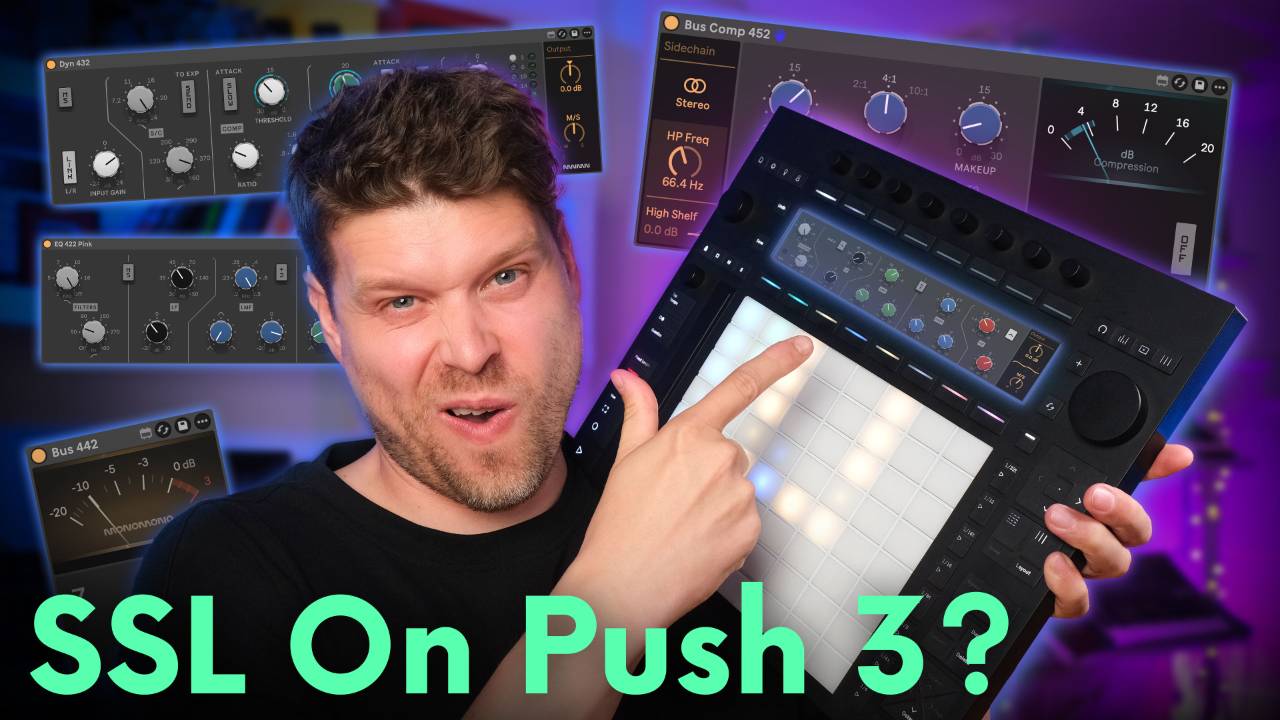
In this article I'm going to take a look at Console 40 by Monomono.
It's a suite of 7 Max for Live devices modelled on the SSL 4000 console, built to run on the Ableton Push 3 standalone as well as inside Ableton Live, and this article goes through each device, what it is, what it's good at, and how I use it on my own mixes.
The Push 3 standalone can't load a single third party VST, so until now the SSL sound has stayed on the laptop.
Console 40 puts it on the Push.
There's a dial on the Black EQ that the real desk never had, and it's my favourite thing in the suite.
There's also a device in here with no counterpart on the console at all, and it's the one that fixes the SSL's only real weakness.
Both are below.
Everything here comes from mixing with the suite on my own Push 3 standalone, drum bus to master.
Key Takeaways on Console 40 for the Ableton Push 3 Standalone
- Console 40 is 7 SSL 4000 devices for £72, down from £90. It runs on the Push 3 standalone and the Push 2, and needs Live 11 or 12 Standard with Max for Live or Suite.
- The EQ 424 Black is the surgical EQ and the EQ 422 Pink is the broad brush. Black bells hold their width at any gain, Pink bells widen on gentle moves and tighten as you push.
- The Black EQ has a resonance trim on the high-pass filter that the hardware never had. Turn it up and you get a bass bump right at the cutoff.
- The Dyn 432 runs a compressor and an expander through 1 gain stage at the same time. It adds level as it compresses, so trim the output afterwards.
- The Bus 442 is the 1 device with no counterpart on the desk. Bias adds even harmonics and clip catches the peaks, for next to nothing in CPU.
- The Bus Comp 452 is the SSL bus compressor with bias and clip bolted on. Run it at 4:1 with a slow attack and 2 to 4 dB of reduction and the mix glues down.
What Is Console 40 by Monomono?
Console 40 is a collection of Max for Live devices modelled on the EQs and compressors from variants of the SSL 4000 console.
The SL 4000 arrived in 1977, put a compressor and gate on every channel 2 years later with the E series, and got a redesigned EQ card with the G series in 1987.
By 1996, 83 percent of that year's Billboard number 1 singles had been made on one.
Monomono built Console 40 from the circuits component by component, tolerances included, so no 2 channels respond exactly the same way, which is how the real desk behaved.
There are 7 devices in the download.
EQ 424 Black, EQ 422 Pink and EQ 420 Pink cover the channel EQ.
Dyn 432 is the channel dynamics, Bus 442 is the colour stage, Harmonic Saturation is a separate inductor style saturation device, and Bus Comp 452 is the bus compressor.
This article covers the 6 I run across a mix, which is everything except the Harmonic Saturation device.
The reason any of this matters on the Push 3 standalone is that it can't run VST or AU plugins, but it can run Max for Live.
Every device in Console 40 is a Max for Live audio effect, so the whole SSL channel loads on the Push the same way Ableton's stock devices do.
Monomono have added a few twists of their own on top of the SSL design.
A resonance trim on the Black EQ's high-pass filter and a mid side mode on the EQs and dynamics, plus a bias and clip stage on the bus devices for when the SSL sound is too clean.
It's the same approach that made Monomono's first Max for Live devices my go to for warmth on the Push 3.
It needs Ableton Live 11 or 12 Standard with Max for Live installed, or Suite, on Mac or Windows.
At the time of writing, October 2026, the suite is £72 at Isotonik Studios, down from £90.
SSL EQs on the Ableton Push 3 Standalone
Console 40 gives you 3 channel EQs, and they come from 2 different cards on the desk.
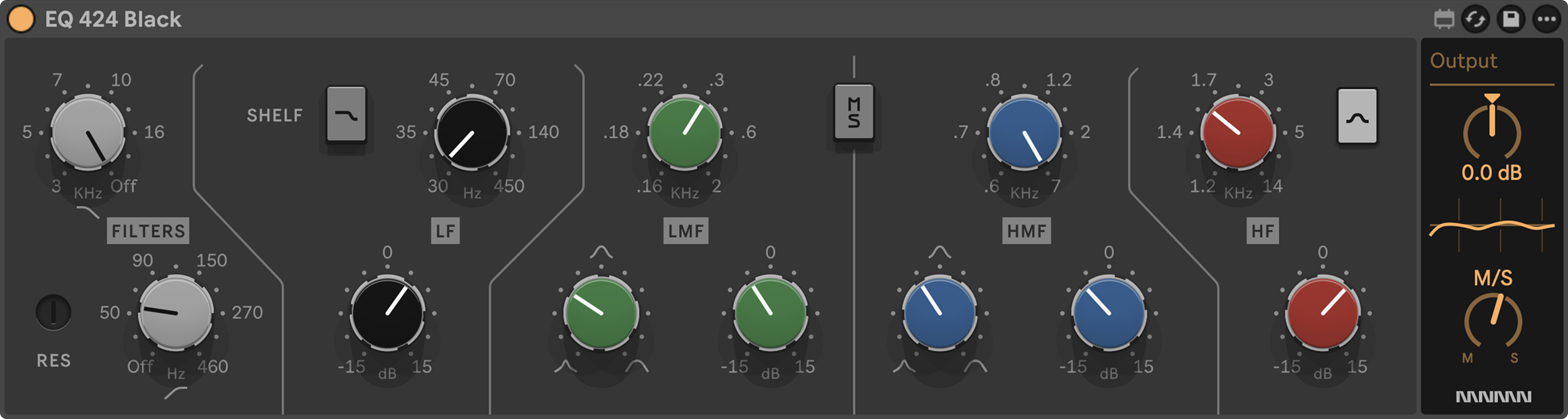
The EQ 424 Black is the E series card from 1985.
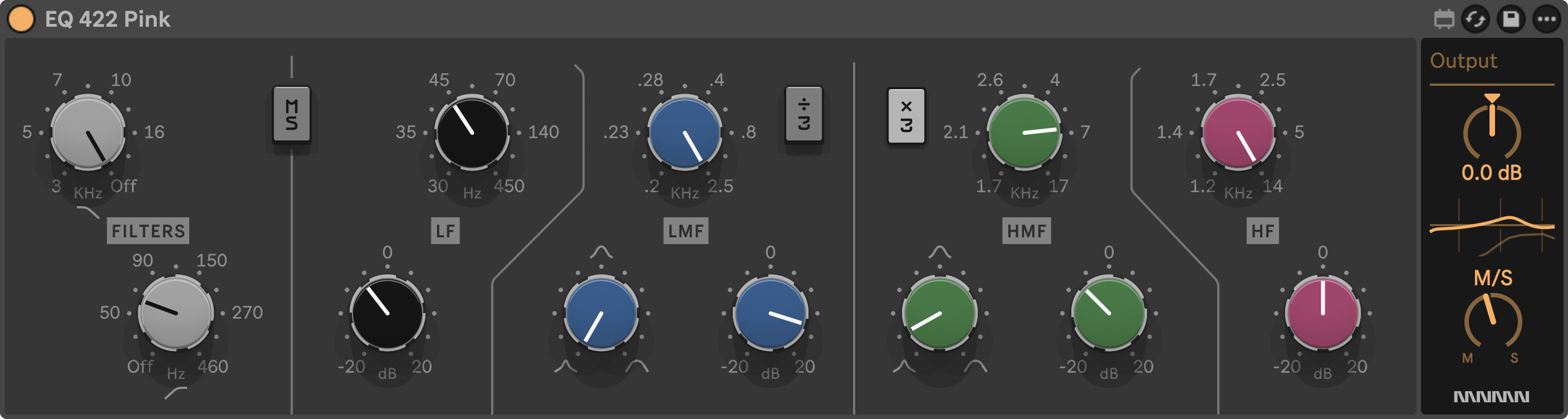
The EQ 422 Pink is the G series card from 1987.
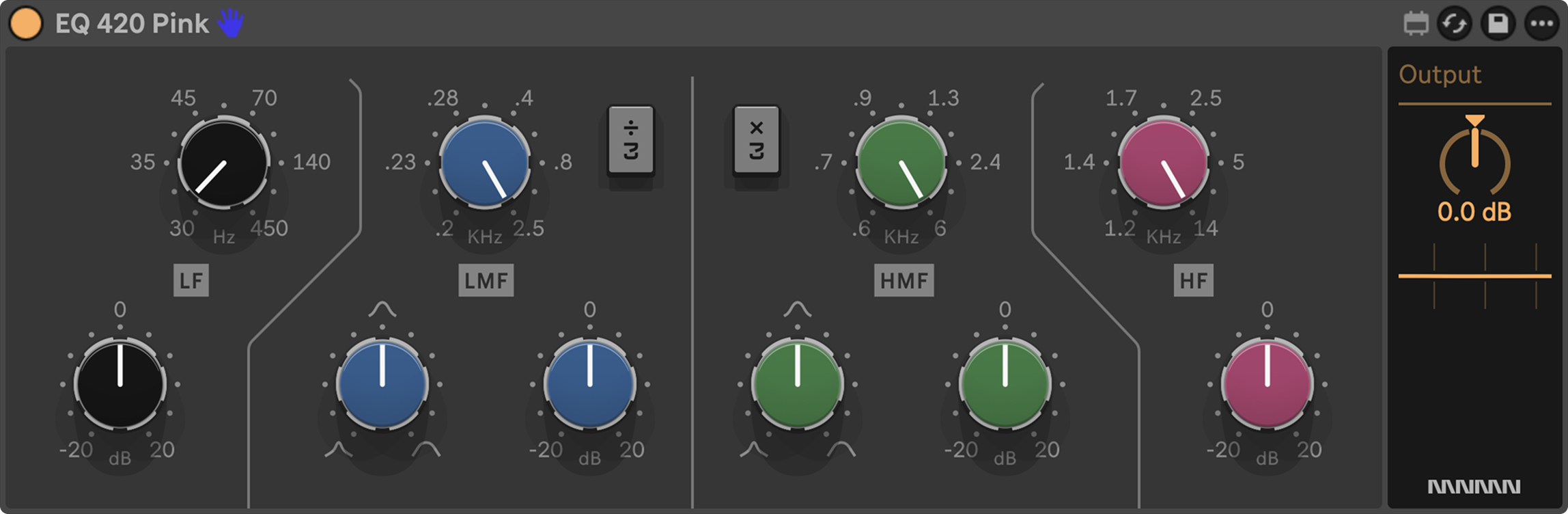
The EQ 420 Pink is the 422 stripped back to its 4 bands.
Every channel of the SSL had a 4 band parametric EQ with high-pass and low-pass filters, and over the desk's life that card was redesigned several times.
Until 1987 the colour of the low frequency knob caps told you which card a channel had.
The first E series desks shipped with the Brown card.
The Black came next, built out of conversations with working engineers, with more boost and cut and tighter control of the low end, plus a steeper high-pass, and from the summer of 1985 it replaced the Brown as standard.
The G series card was shaped through listening tests with professional engineers.
Its bells narrow as they're pushed and its shelves dip slightly before they lift.
The ×3 and ÷3 switches let the mid bands reach into the lows and the highs.
The colour code was dropped at the same time and the name Pink came later.
Both topologies have the same 4 bands plus filters.
What differs is how the bells respond when you turn the gain up.
EQ 424 Black
The EQ 424 Black is the precise, punchy EQ.
Its bells keep the width you set at any gain, so a narrow cut stays narrow however deep you go and a gentle lift stays exactly as wide as you set it.
That makes it the choice for detail work.
Tight drums and a low end with real weight, plus sources that need pushing forward in a crowded mix.
Monomono's own list of what it's good at reads like a drum bus brief.
Punchy drums with a low end that holds solid when you boost hard, precise lifts and clean scoops, vocals and guitars pushed forward to cut through, and a round, full tone for pop, R&B and hip hop.
All 4 bands give you up to 15 dB either way.
The low band and the high band each have a shelf or bell toggle, so the low band can lift the punch of a kick without pumping up the sub, and the high band can add presence without bringing up the hiss.
The 2 mid bands are bells with a Q dial from a tight peak to a broad curve.
The high-pass sweeps up from 20 Hz with a soft knee, the low-pass from 3 to 24 kHz, and next to the high-pass sits the RES trim.
The hardware never had it.
It adds a lift right at the corner frequency, so a little tightens the bottom as it rolls away and a lot makes the corner sing.
I like to put the EQ 424 Black on the drum bus.
Here's a quick tip for loading any of these Max for Live devices on the Push 3.
Go to Device, select Max for Live, then choose Filter, scroll to Creator and pick User.
That hides every Ableton Max for Live device and leaves you with only the ones you've dragged in yourself, so it's a lot easier to search around.
If you don't know how to get Max for Live devices onto the Ableton Push 3 standalone, this article walks you through it step by step.
Monomono have laid the device out in folders on the Push screen.
Lows, highs, filters and settings.
If you go into the lows folder, it's laid out a lot more like the original hardware.
You have frequency and gain, and then you can choose between shelf or bell.
From there my approach is the same on every band.
Turn the gain up, scan through the frequencies until I find the right point, then bring the gain back to a sensible amount.
That's how I like working on SSL consoles, because you get into a flow state and use your ears over your eyes.
It leans well into the Push 3, where you've got encoders under your hands rather than a parametric EQ on a screen.
EQ 422 Pink and EQ 420 Pink
The EQ 422 Pink is the broad brush.
Its bells widen as you back off and tighten as you push, so gentle moves stay smooth and natural while big ones become focused on their own.
Engineers reached for it to shape tone rather than fix problems.
Overall EQ on groups and busses, subtle polish on vocals and instruments, and bells that the ×3 and ÷3 switches can place anywhere from the deep lows to the air.
Monomono's list for the Pink is the other half of a mix.
Gentle tone shaping on vocals and instruments, wide musical curves on busses and the whole mix, sharp mid forward boosts that give rock guitars their bite, and crisp overheads and hi-hats.
All 4 bands give you up to 20 dB either way, and the outer bands are always shelves.
The low mid band is modelled on the inductor circuitry of a passive EQ, so it adds a subtle saturation along with the shape, which you'll hear most on vocals, guitars, snares and synths.
The ÷3 switch drops that band down to 50 to 600 Hz for the body of a sound, and ×3 lifts the high mid band up to 1.7 to 17 kHz for sparkle on cymbals or air above a vocal.
The filters are steeper than the Black's.
The high-pass rolls off at 18 dB per octave with a sharp knee and most of its travel sits below 70 Hz, so trimming rumble or sub build up is a precise move.
The EQ 420 Pink is the 422's 4 bands without the filter section or the mid side mode.
Same bells, same ×3 and ÷3, lighter on the screen and lighter on the Push.
Monomono's developer says he reaches for the 420 more than any other EQ in the suite, because the wider range where the bands interact suits how he works.
So the 420 and the 422 are the same EQ, 1 with the filters and 1 without.
There's also a new feature added to the 422 Pink, which you also get on the Black EQ, and that's a mid side mode, which you don't usually see on an SSL EQ.
It means you can EQ the sides differently to the mids, and there's an MS button where you can listen to the mids in solo and the sides in solo as well.
You'll find it in the filters folder on the Push, and it's where the 422 Pink earns its keep for me.
EQ 422 Pink vs EQ 424 Black, Which SSL EQ to Use
Pink for broad strokes, Black for surgery.
That's the short version, and it's how engineers used the desk.
Many of them ran both cards side by side, the Black for detail work and the Pink to shape the overall character.
The difference is in the bells.
Turn the gain up on the Black and the bell stays the width you set it.
Turn the gain up on the Pink and the bell tightens on its own.
So a 3 dB dip on a boxy snare stays narrow on the Black, and a 10 dB lift on a vocal stays focused on the Pink without you touching the Q.
If you want 4 bells and mid side, the Black is the one.
If you want tone shaping with wide bands that overlap, the Pink or the 420.
Console 40 includes all 3, so you can build a channel strip for the material rather than making 1 EQ do everything.
My own split on the Push tends to be the Black on drums and bass, where I want the low end held in place, and the Pink on keys and the wider sources, where I want the mid side mode and a softer hand.
Dyn 432 Channel Dynamics
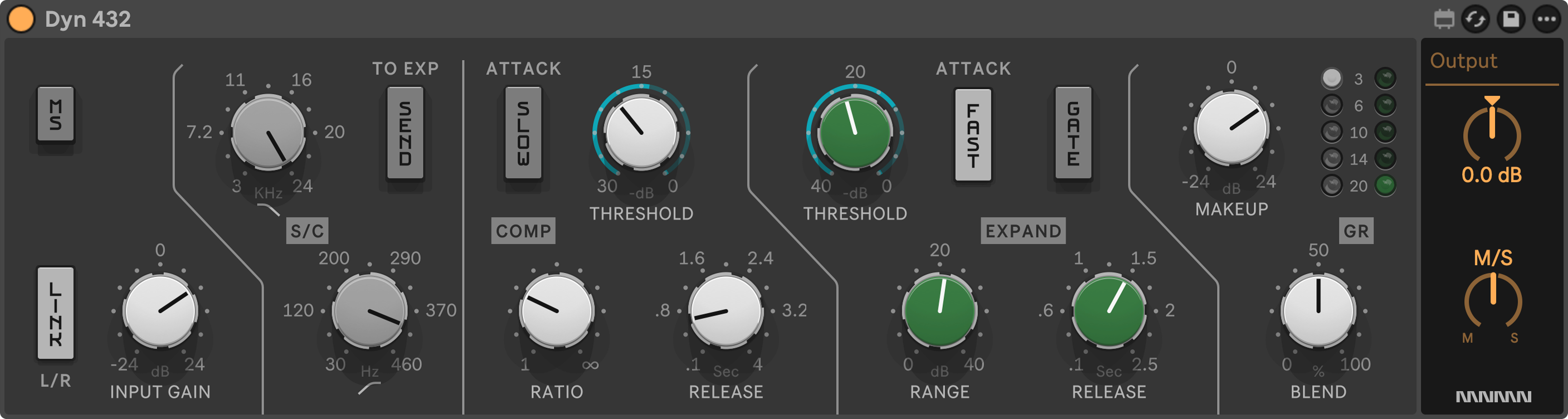
The Dyn 432 is the compressor and expander that sat on every channel of the E series desk.
Hugh Padgham called it the first console where you didn't have to ask the assistant to patch in a compressor or a gate.
You pressed a button and it was there.
The 2 halves share 1 gain stage and can work at the same time.
The audio runs straight through a single VCA, and everything else happens on a side branch.
The signal is tapped before the VCA, trimmed by input gain and shaped by the sidechain filters, then measured by a true RMS detector that responds to how loud the signal is over time rather than every peak.
That 1 measurement feeds the compressor and the expander side by side, and whichever asks for more reduction takes over.
It's a feed forward design, which is what makes it fast and predictable and lets the ratio run all the way to a limiter.
It's also what gives it the character Andy Wallace calls pretty aggressive sounding.
The compressor has threshold, ratio from 1:1 to limiting, a fast or slow attack switch, release from around 50 ms to 4 seconds, and automatic make-up, so the output comes up as you lower the threshold and you judge the sound rather than the volume.
The expander works the quiet parts, with a 2:1 slope so the background fades rather than cuts, and a gate switch that turns it into a hard gate for drums.
Sidechain high-pass and low-pass filters decide what both halves listen to, so bass stops pumping the compressor and cymbals stop opening the gate.
Link holds the stereo image steady and mid side lets you treat the centre and the sides separately.
Blend brings the dry signal back in for parallel compression.
Monomono's list of what it's good at covers most of a mix.
Control on a vocal or bass, punch on drums with a slow attack and short release, levelling with a low ratio and long release, tightening a stack of backing vocals, and bite on guitars with a fast attack and a few dB of reduction.
I like to put it on the drum and percussion track to lock them together.
A bit of compression for punch, then the expander to accent the transients so the drums hit harder.
The automatic make-up brings the level up as you go, so I always trim the output afterwards.
What you're left with is clean and under control.
That's the SSL thing.
Transparent.
Bus 442 Mix Bus Saturation
Monomono went through the console's schematics looking for a source of colour and found none.
Not in the channels or the summing bus, and not in the preamps, which stay linear until they hit the supply rails.
That's great engineering and it leaves the signal clean, but they wanted a way to put some colour into the chain, and this is how the Bus 442 came about.
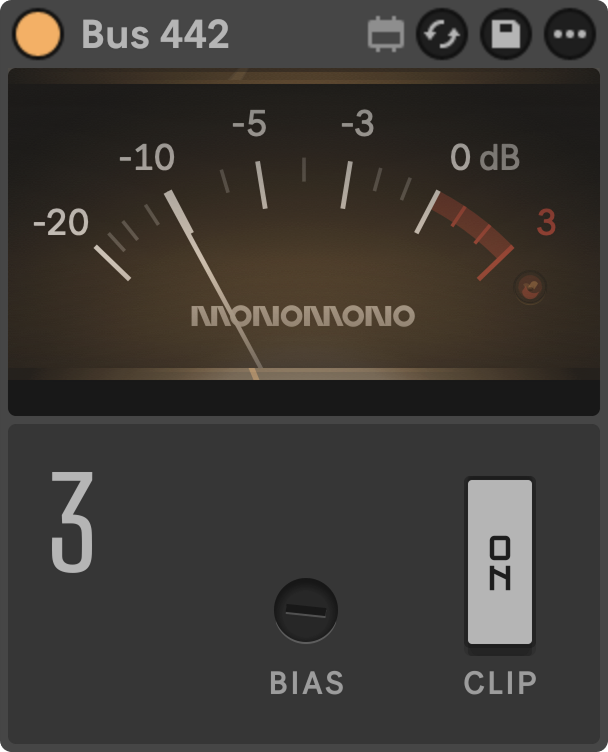
It takes the VCA from the bus compressor and gives you its symmetry trim on the front panel as bias.
Lean on it and it adds even harmonics, mostly the 2nd, and nothing else.
The other colour is the console's own hard clip at the supply rails, tamed into a peak stop you switch in with clip.
Bias works at any level, so a small amount left in all the time is the natural way to use it.
Clip only acts when peaks reach the ceiling, so how much of it you get is set by how hard you drive in.
The VU meter on top does nothing for the sound.
It looks nice, like the meter bridge on a console, and it moves like the real thing.
Monomono say to place it at the end of each track or bus and set bias to taste, then switch clip on where peaks are getting through a bit too hard.
With clip off it costs next to nothing in CPU.
It's about as simple as a device gets, 1 dial and 1 switch, and that's the point.
I like it on the drums for a bit of grit and on the bass for warmth on top, because those 2nd order harmonics read as body.
On the master it pulls the whole mix a little warmer.
Bus Comp 452, the SSL G Bus Compressor
Then the one everyone wants when SSL gets mentioned.
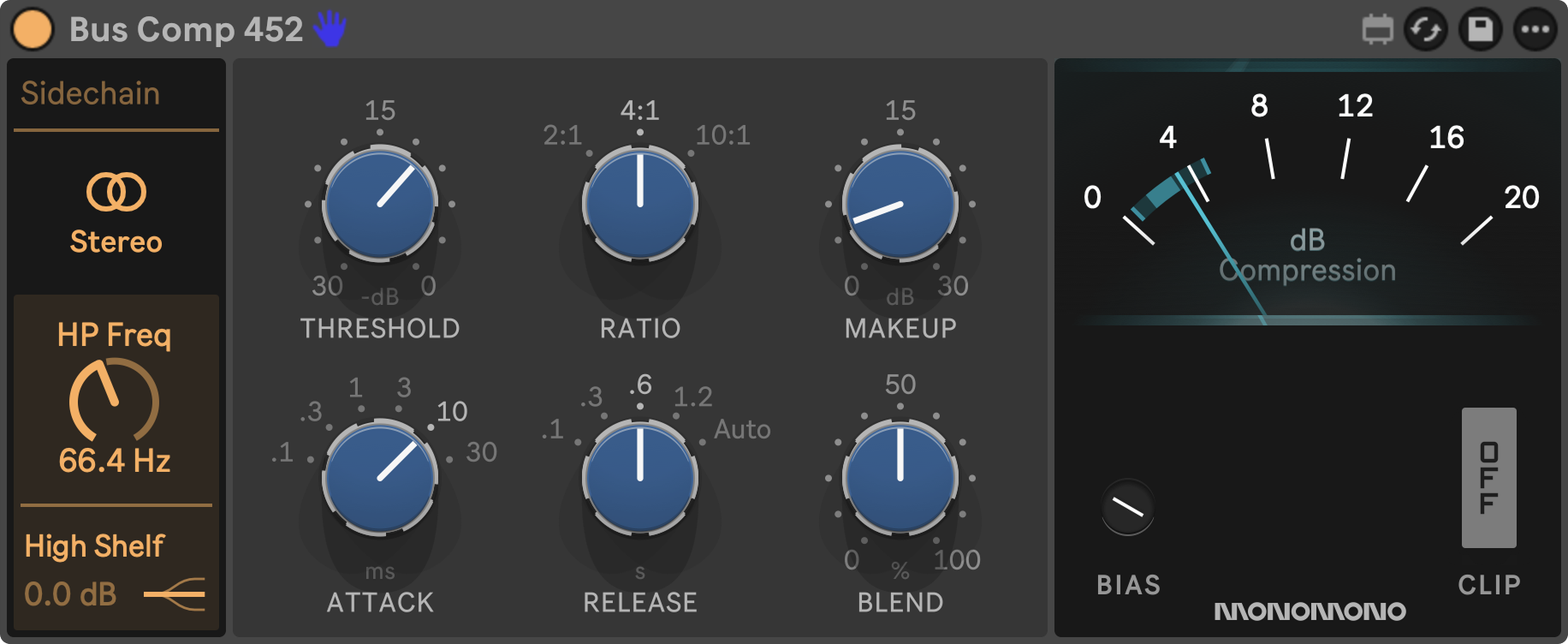
The Bus Comp 452 is the bus compressor from the desk's centre section, the 1 that countless records passed through, and it's where a Console 40 mix comes together.
It's built differently from the Dyn 432.
Where the channel compressor is feed forward and measures the signal once, the bus compressor has a feedback loop.
Every bit of gain reduction changes what the detector hears, so it keeps correcting itself and settles into the music instead of grabbing it.
The knee is soft and the gain moves smoothly, so even 10:1 holds peaks firmly without the hard edge of a limiter.
That's the relaxed, laid back response, and it's why the 452 can sit across a whole mix for hours without drawing attention to itself.
The controls click into fixed positions like the switches on the original card.
There are 3 ratios.
2:1 starts early and gentle.
4:1 is the classic whole mix setting.
10:1 waits longest and then clamps hard, which makes it the one for a drum bus or for catching stray peaks.
Attack comes in 6 steps from 0.1 to 30 ms, with 30 ms the usual starting point on a mix.
Release comes in 4 fixed times from 0.1 to 1.2 seconds plus auto, which follows the length of the peak that caused the reduction and is the safest choice on a full mix.
There's no automatic make-up here, so anything under the threshold passes at the level it came in and you bring it back with the make-up dial.
Blend mixes in the untouched signal and a sidechain high-pass keeps the low end from driving the compression.
There's a high shelf and a stereo link too.
Monomono have also put bias and clip in here, so you can add harmonics and clip the peaks for a bit more crunch without reaching for the Bus 442 as well.
Their own approach is to switch it on halfway through the mix at 4:1, slow attack and release, 2 to 4 dB of compression on average, and keep mixing into it.
I like to put it on the master at 4:1 with a slow attack and release, and run it so the needle moves 2 to 4 dB on the loudest parts.
A touch of bias for the harmonics, clip if the mix wants crunch.
Does the Ableton Push 3 Have Enough CPU for Max for Live Mixing?
This is the most important question in this article.
The Push 3 doesn't have the fastest processor and it doesn't have the best computer inside it.
I'm still hoping Ableton updates that one day.
A mix that matters needs a lot of tracks, which means a lot of instances of these devices, and the EQ and the bus saturation are the ones that start adding up.
When a computer can't keep up, the audio starts crackling, even with the buffer size maxed out.
That's rubbish in Ableton Live.
It's especially rubbish on the Push 3.
So Monomono have made these devices very CPU friendly, and that's the reason a full session of them runs on the standalone.
They've also made them low latency.
Every EQ in the suite runs under half a millisecond.
You won't notice that.
It means you can track through them in real time, which matters if you're recording through the audio interface built into the Push 3.
Low CPU and low latency together mean the whole suite can sit across a big mixing session on the Push 3 standalone without the Push falling over.
Thank you, Monomono.
Why Mix on the Ableton Push 3 Standalone Instead of a Computer?
We can do all this in Ableton Live, the computer has far more RAM and processing power, so why bother doing it on the Push 3?
Fair enough.
I often think about the old school workflow, a mix engineer in front of an analogue console with no screen, inside the music rather than staring at it.
I spend most of my working day looking at a screen.
The last thing I want when I finish is to come home and stare at another one.
Getting off the screen and mixing the analogue way, while keeping the editing and recall of a DAW, is something I've started exploring over the last few months.
A Push 3 standalone with Console 40 on it is close to a portable analogue console you can take anywhere.
Headphones on and eyes shut, inside the tune until it sounds right.
And because it's Ableton, the bridge handles the rest.
Transfer the project from the Push 3 standalone back into Ableton Live and it opens with the same devices and the same settings.
Is Console 40 Worth It on the Ableton Push 3 Standalone?
Yes.
The devices run on the Push 3 standalone and they work in Ableton Live.
They sound great, and they look the part on the Push screen too.
For £72 you get the complete SSL workflow.
All 3 EQs, the dynamics strip, the bus stage and the bus compressor, on the Push 3 and in Live.
That's the October 2026 price, down from £90, so check it before you buy.
There's 1 caveat.
This bundle is transparent, because that's the SSL sound.
It was designed to be the opposite of a Neve, which has the warm, saturated thing.
If warmth is what you're after, Monomono have a Neve suite called Console×8056, and it runs on the Push 3 standalone too.
I built a whole mix with it in the analogue studio inside the Push 3 standalone post, so you can hear the warm side of the argument before you pick.
For everyone else, Console 40 gets the console workflow onto the Push 3 and gets you off the screen.
We could all do with a screen break now and then.
Frequently Asked Questions
Can you use third-party VST plugins on the Ableton Push 3 standalone?
No.
The Push 3 standalone has no VST or AU support, and Ableton's own advice for a Set that uses plugins is to freeze those tracks in Live before you transfer it to the Push.
The Push then plays the frozen audio, so the sound comes across but you can't tweak the plugin on the hardware.
For processing you can adjust on the Push itself, Max for Live is the only route.
That's why a Max for Live suite like Console 40 matters on the standalone and a VST version never would.
Does the Monomono Console 40 bundle work in Ableton Live as well as the Ableton Push 3?
Yes.
Every device in Console 40 is a standard Max for Live audio effect, so the same .amxd runs in Ableton Live on your computer and on the Push 3, with the same settings and the same sound.
Isotonik list it as running on the Push 3 standalone and the Push 2, and Live 11 and 12 on Mac and Windows.
A project mixed on the Push opens in Live with every device in place, so you're never maintaining 2 versions of a chain.
How do you get Max for Live devices onto the Ableton Push 3 standalone?
Through Live's browser over Wi-Fi.
Connect the Push and your computer to the same network and pair them, then the Push label appears in Live's browser.
Drag the .amxd file onto the Push label and it lands in the Push User Library, where you can move it into a folder.
Do this before transferring a Set that uses the device, because Ableton says third party Max for Live devices don't travel inside a Set.
The USB ports won't move files at all.
On the Push, go to Device, then Max for Live, then Filter, Creator, User to see only your own devices.
What version of Ableton Live do I need to run Max for Live devices on the Ableton Push 3 standalone?
Live Standard with Max for Live installed, or Live Suite, on Live 11 or 12.
Live Intro and Live Lite can't run Max for Live.
The Push 3 standalone ships with Live 12 Intro pre-installed, so out of the box it won't load third party Max for Live devices.
Authorise your own Standard with Max for Live or Suite licence on the Push and the devices load like any stock effect.
Console 40 needs exactly that, Live 11 or 12 Standard with Max for Live, or Suite.
Is Ableton's Glue Compressor an SSL compressor?
In all but name.
Ableton built the Glue Compressor with Cytomic and both describe it as modelled on a classic 1980s British console bus compressor.
Neither names SSL, but that's the desk they mean.
It's a stock device, so it runs on the Push 3 standalone already.
What it doesn't give you is the rest of the SSL channel, the EQ cards and the channel dynamics.
That's the gap Console 40 fills, and its Bus Comp 452 adds bias and clip for when you want the glue with a bit of grit on top.
Can you mix a full track on the Ableton Push 3 standalone?
Yes, with the right devices.
The Push 3 doesn't have a fast processor, so a session full of heavy Max for Live devices will crackle even with the buffer maxed out.
Console 40 is built to be CPU friendly, which is why a whole mix of it runs on the standalone.
The limit is arrangement view, which Ableton says can be played back on the Push but not edited.
Mix on the Push with headphones on, then transfer the Set back to Live for arrangement and export.
What is the difference between the SSL sound and the Neve sound?
SSL is transparent.
The EQs and compressors were designed to keep everything clean and under control without adding much of their own character, which is why the SSL 4000 ended up on so many pop records.
Neve is the opposite, warm and saturated, with the transformers and preamps doing a lot of the work.
If you want the clean, punchy thing on the Push 3 standalone, Console 40 is the SSL option.
If you want warmth, Monomono's Console×8056 is their Neve suite and it runs on the Push too.
About the Author
Craig Lowe is a professional touring playback engineer, Ableton Live specialist and educator based in the UK.
He has over 10 years of teaching experience, online at Push Patterns and at universities including ICMP, BIMM, ACM and ThinkSpace Education.
His Ableton programming credits include Sam Fender, Melanie C, Years & Years and Skunk Anansie.
He runs Push Patterns, where over 1,000 students have learned to produce and perform with Ableton Live, at pushpatterns.com.
If you are interested in learning Ableton Live 12 or the Push 3 in a bit more detail, check the course here:
