
Ableton Move vs Ableton Push 3: Which One Should You Buy?
Jul 12, 2026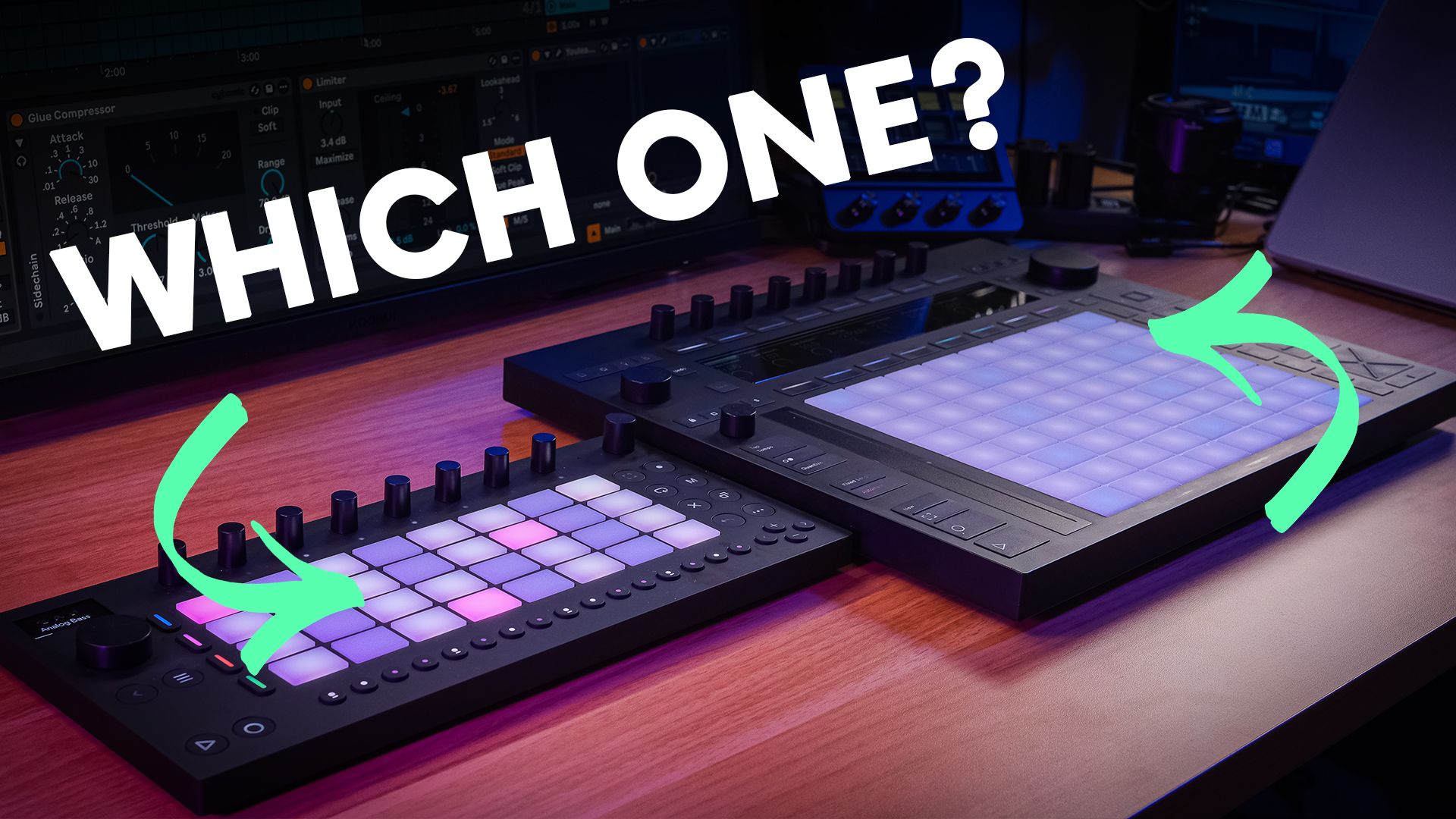
I've taught Ableton Live for over 10 years, online at Push Patterns and in universities, and I've lost count of the people I've watched buy the wrong Ableton hardware.
The Ableton Move vs Ableton Push 3 decision is where most of them go wrong.
On paper it looks like a price question.
The Ableton Move is just over £400.
The Ableton Push 3 is £879 as a Controller and £1,299 as a Standalone.
Cheap one or expensive one. Simple.
Except there are 3 options here, not 2, and the 2 Push versions are more different than most buyers realise.
I've used both devices properly, in the studio and away from it, and I've sent students towards each one for different reasons.
So this is a buying guide, not a spec sheet.
The specs are all here, but they're not the question.
The question is how and where you make music.
Answer that honestly and the right device picks itself.
Ableton Move vs Ableton Push 3 Quick Summary
The Ableton Move costs just over £400 and is built for starting ideas away from the computer.
The Ableton Push 3 Controller is £879 and runs alongside a computer with Ableton Live on it.
The Ableton Push 3 Standalone is £1,299 and has a computer inside, so it runs Ableton Live on its own.
The Move is a 4-track sketch pad. You start ideas on it and finish them in Live.
The Push is the full Ableton experience, with the best pads on any controller.
The Standalone's battery lasts about 2 hours, so it is less portable than it looks.
Buy the one that matches the way you make music, not the one with the biggest spec sheet.
Ableton Move vs Ableton Push 3 Key Takeaways
- The Ableton Move vs Ableton Push 3 decision is a workflow decision, not a spec decision. Where and how you make music matters more than any number on the box.
- The Move is a sketch pad, and that is the point. 4 tracks, sounds loaded from the second you switch it on, and a brilliant sampling workflow for capturing ideas fast.
- The Ableton Push 3 is the full Ableton experience in hardware. MPE pads, a proper sequencer, deep sound design, and connections that hold up in a real studio.
- The Standalone is not the portable option people assume it is. The battery lasts about 2 hours and the unit is heavy. The Move is the one that travels.
- Buy the Controller if you work at a desk. It does the same job as the Standalone next to a computer and saves you £420.
What's the Difference Between Ableton Move and Ableton Push 3?
They look like siblings. They're closer to different species.
The Move descends from Ableton Note, the £6 iOS app for sketching ideas on your phone.
The Move is the hardware version of that idea.
Note gives you 8 tracks, the Move gives you 4, and both are built for speed over depth.
The Ableton Push 3 runs Ableton Live itself.
Not a cut-down version. The same Live you use on your laptop, driven from 64 pads and a screen.
Then there's the split inside the Push family, and this is the bit that catches people out.
The Push 3 Controller has no computer inside. It needs a laptop running Live to do anything.
The Push 3 Standalone has an Intel i3, 8GB of RAM, and a 256GB drive inside. It runs Live with no laptop in the room.
Same pads, same screen, same everything on the surface. The £420 difference is the computer.
So the real comparison is 3-way. A portable sketch pad, a Live controller that lives on a desk, and a self-contained Live machine.
Ableton Move vs Ableton Push 3 Price
The Move is just over £400.
The Ableton Push 3 Controller is £879.
The Ableton Push 3 Standalone is £1,299. More than 3 times the price of the Move.
That gap looks brutal, but the 3 prices are buying 3 different jobs.
The Move's £400 buys you idea capture.
The Controller's £879 buys you the deepest hands-on control of Ableton Live that exists.
The Standalone's £1,299 buys you that control plus independence from the laptop.
None of them is bad value for the job it does. All of them are terrible value for a job they don't do.
Do not spend £1,299 because it's the flagship. Spend it because you'll use the thing the extra £899 buys.
What Is the Ableton Move?
The Move is a small standalone groovebox with a phone-style processor, 2GB of RAM, and 64GB of storage.
You get 32 pads, 8 endless encoders, a small OLED screen, built-in speakers, and a built-in mic.
Round the back there's USB-C, a USB-A port for a keyboard or MIDI gear, and an audio input for sampling.
The battery runs about 4 hours and the unit stays cool the whole time.
The bit I love is what happens when you start a new set.
The 4 tracks arrive loaded with a drum kit, a chord sound, a bass, and a lead.
You switch it on and you're making music inside a minute.
That's the whole design philosophy. Friction removed everywhere.
The sampling workflow is the standout.
Point the built-in mic at anything in the room, and the Move records it, then trims it and drops it onto a pad.
You can build a drum rack out of your kitchen in a couple of minutes.
The 2.0 update added audio tracks, which pushed it from a MIDI sketch pad towards something you can record real sound into.
I did a complete walkthrough of the Move when it first came out, and my full Ableton Move deep dive goes through all of it.
It's a genuinely clever little box. The limitations are the design, and we need to talk about them.
Is the Ableton Move Worth It?
Here's the objection everyone raises first. 4 tracks. That's it. Surely that's not enough.
I think the 4-track limit is one of the best things about the Move.
I've watched students drown in unlimited tracks for years. Endless options, endless loops, nothing finished.
4 tracks with sounds already loaded forces you to commit to ideas instead of hoarding them.
That said, I'll be straight about the rest of the limitations, because they're the reason a lot of people send the Move back.
Sound design is shallow. You're working with stock devices only, and even then not all of them.
Drift, my favourite Ableton synth, is a paid add-on on the Move. That one annoys me every time I think about it.
There's no deep editing or proper arranging, and you can't load your Live sets onto it.
So is the Move worth it? Yes, for one specific person.
The producer who wants to start ideas on the sofa or on the train, and finish them properly in Live later.
For a beginner, it might be the friendliest way into the Ableton world that exists.
If you're a beginner weighing up the Push instead, I've answered whether the Ableton Push 3 is good for beginners in its own post.
As your only music-making device, it will frustrate you within a month.
It's a sketch pad. Treat it as one and it earns its £400.
Is the Ableton Push 3 Worth the Extra Money?
The pads are the place to start.
The Ableton Push 3 has 64 MPE pads, and they are the best pads on any controller. Full stop.
Every pad responds to pressure and movement per note, so you can bend and shape sounds under your fingers like a real instrument.
Once you've played them, normal pads feel dead. That's the honest cost of trying a Push 3.
The drum sequencer is a jewel in the Push's crown.
My mates who run Launchpads tell me the same thing every time they see it. They wish they had Note Repeat and that sequencer sitting above the pads.
Then there's the update Ableton shipped that I completely missed when it landed.
You can now map Ableton's modulation devices, LFOs and envelopes, directly onto parameters from the Push itself.
It turns the hardware into a modular-style playground.
There's also XYZ mode, which gives you Kaoss pad style control over any device.
The connections are studio-grade.
Built-in audio interface, MIDI in and out, CV and gate for modular gear, and support for class-compliant interfaces.
I run my RME Fireface straight into mine in class-compliant mode and it works without a fight, with ADAT there if you want to expand to proper studio levels.
The Push ships with Ableton Live Intro, and a Standard or Suite licence transfers onto the device.
One honest gripe. Browsing and loading sounds on the Push feels clunky and long.
You get used to it, and favourites lists help, but it never feels fast.
So is it worth the extra money over the Move? If you want the full Ableton experience in hardware, yes.
Nothing else does what it does.
If the Push route is calling, my Ableton Push 3 course takes you through the whole device properly, workflows and all.
Ableton Push 3 Controller vs Standalone
Same pads. Same screen. Same £879 worth of hardware. The Standalone adds a computer inside for another £420.
The pitch is that you make music anywhere, no laptop required.
Here's what happened when I bought mine.
I got a bag for it, convinced I'd be making tracks out in the world.
I managed it about twice.
The thing is heavy. The battery lasts about 2 hours. And it heats up while you work, so you're aware of the clock the whole time.
The Standalone earns its money in a different way.
It's brilliant as the centre of a studio or a live rig, running Live with no laptop on stage or on the desk.
That's where mine lives now, and it's superb at it.
So here's the honest split.
Buy the Controller if your music happens at a desk next to a computer. You lose nothing that matters and keep £420.
Buy the Standalone if you specifically want Ableton Live without a laptop, in the studio or on stage.
If you're leaning Standalone, my full breakdown of whether the Push 3 Standalone is still worth buying in 2026 goes deeper on who it suits.
Do not buy the Standalone as a portable device.
That's the Move's job, and the Move does it better at less than a third of the price.
Can Ableton Move Control Ableton Live?
Yes. Plug the Move in over USB-C and it works as a controller for Live, with the pads and encoders mapped to whatever you're working on.
It's no Push replacement in that mode, but as a compact controller it's handy.
The more interesting question is how ideas travel between the devices, because this is where the Move's biggest limitation lives.
Transfer is one-way.
Move Manager, the browser tool, moves your Move sets into Ableton Live. Nothing goes back.
Change the project on your laptop and the Move never finds out, and you can't load a Live set onto the Move at all.
Start on the Move, finish in Live. That's the direction of travel, permanently.
Ableton Cloud softens this.
Sets from the Move sync into Live over Wi-Fi on their own, so the sofa idea is sitting on your laptop by the time you open it.
Then there's Link Audio, which streams audio wirelessly from the Move into Live or into a Push.
The 2 devices can sync and record each other with no cables, which still feels slightly like a magic trick.
Handy on a train too, as long as your headphones are plugged in.
The Ableton Push 3 does its own version of continuity.
It creates a hotspot for wireless project transfer, and the Push user library shows up inside Live.
The ecosystem is genuinely well joined up. It's the one-way door on the Move you have to plan around.
Which Ableton Controller Should You Buy?
Here's the verdict, per person.
Buy the Ableton Move if you want to start ideas away from the computer and finish them in Live.
Just over £400 for the best sketch pad Ableton makes. Accept that it's a sketch pad and it will not disappoint you.
Buy the Ableton Push 3 Controller if you make music at a desk and want the full Ableton experience under your hands.
£879, and for a desk-based producer it's the sweet spot of the whole range.
Buy the Ableton Push 3 Standalone if you specifically need Ableton Live without a laptop, in the studio or on stage.
£1,299, and worth it for that person only.
There's no winner in the Ableton Move vs Ableton Push 3 fight. There's a right answer for the way you work, and you already know which one it is.
One last thing before you spend anything.
A second-hand Push 2 can cost less than a Move, and it holds up far better than people expect.
If the second-hand route appeals, my Push 1 vs Push 2 vs Push 3 comparison covers what each generation still does well.
If you want to see the Move and the Push 3 side by side before you decide, the full comparison is on the channel.
Ableton Move vs Ableton Push 3 FAQ
The questions producers ask most about these 2 devices, answered straight.
Does Ableton Move work without a computer?
Yes. The Move is fully standalone, with a phone-style processor, 2GB of RAM, and 64GB of storage inside.
Switch it on and the 4 tracks arrive loaded with sounds, so you're making music inside a minute with no laptop anywhere near it.
The battery runs about 4 hours, and there are built-in speakers and a mic.
The computer only enters the picture when you move ideas into Ableton Live to finish them.
Does Ableton Push 3 come with Ableton Live?
Yes. Every Ableton Push 3 ships with Ableton Live Intro, so it makes music out of the box.
If you already own Live Standard or Suite, that licence transfers onto the device, so the Standalone runs the version you already use.
The Controller needs a computer running Live either way, so whichever version sits on your laptop is the version under your hands.
Can Ableton Move record audio?
Yes. The Move samples audio through its built-in mic or the audio input on the back, and the 2.0 update added proper audio tracks on top of that.
The sampling workflow is the standout.
Record a sound in the room and the Move trims it and drops it straight onto a pad.
You can build a drum rack out of household sounds in a couple of minutes.
Does Ableton Move have MIDI output?
Yes, over USB. The USB-A port on the back connects a keyboard or other MIDI gear, and the Move sends MIDI out to external synths and drum machines as well as receiving it.
There's no traditional 5-pin MIDI socket, so everything runs over USB with class-compliant devices.
If deep MIDI work with external gear matters to you, the Ableton Push 3 has proper MIDI in and out plus CV and gate.
What is the difference between Ableton Move and Ableton Note?
The Move is the hardware version of Note, Ableton's £6 iOS app for sketching ideas on your phone.
Note gives you 8 tracks on a touchscreen.
The Move gives you 4 tracks with real pads, endless encoders, a battery, and a built-in mic for sampling.
Both sync through Ableton Cloud, so a set started on either can carry on in Live.
If you get on with Note, the Move is that workflow with proper hardware under your fingers.
Is Ableton Move good for beginners?
It might be the friendliest way into the Ableton world there is.
A new set arrives with a drum kit, chords, a bass, and a lead already loaded, so a beginner is making music inside a minute instead of staring at an empty screen.
The 4-track limit helps too, because it removes the option paralysis that stalls most new producers.
Learn on the Move, then graduate to Live when your ideas outgrow it.
Can you finish tracks on Ableton Move?
Not properly, and it isn't trying to.
There's no deep editing or arranging on the device, so a Move set gets a track started rather than finished.
The intended workflow is one-way.
Sketch on the Move, then send the set into Ableton Live through Move Manager or Ableton Cloud and finish it there.
Treat the Move as the start of the process and it earns its place. Expect more from it and it disappoints.
Is Ableton Move good for live performance?
It holds its own at a jam.
Link Audio streams its audio wirelessly into Live or a Push, and the built-in speakers cover a kitchen table session.
For a proper gig, the 4 tracks and limited outputs run out fast.
If live performance is the goal, the Ableton Push 3 Standalone is the one built for it, running Ableton Live as the centre of a rig with no laptop on stage.
Is the Ableton Push 2 still worth buying in 2026?
For a lot of people, yes.
A second-hand Push 2 can cost less than a new Move, and it holds up far better than its age suggests.
You lose the standalone side and the MPE pads, but you get the full 64-pad Ableton Live workflow for sketch pad money.
If your budget stops at the Move's price and you always work near a computer, look at a second-hand Push 2 before you buy anything.
About the Author
Craig Lowe is a professional touring playback engineer and Ableton Live educator based in the UK.
His touring credits include Sam Fender, Melanie C, and Years & Years, and he teaches at ICMP, BIMM, and ThinkSpace Education.
He runs Push Patterns, a music production education platform for Ableton Live and Push producers.
If you are interested in learning Ableton Live 12 or the Push 3 in a bit more detail, check the course here:
