
Adam Audio D3V Review
Apr 05, 2026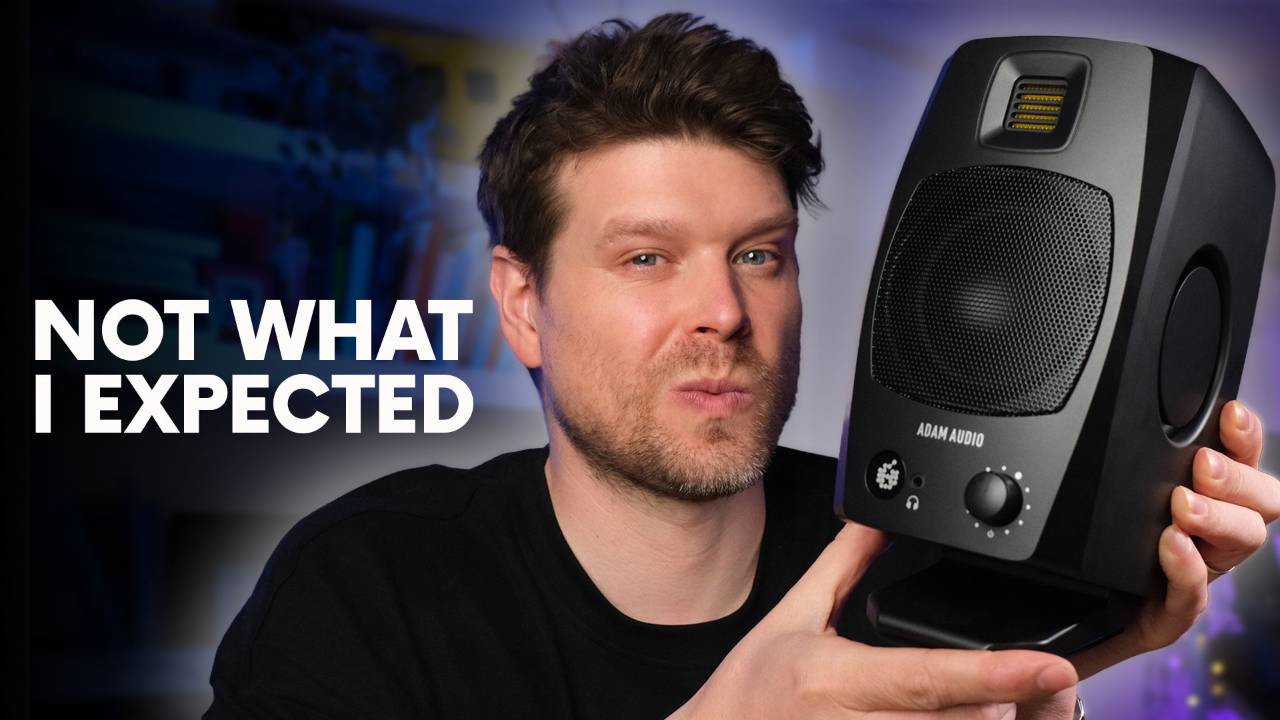
I've been testing the Adam Audio D3V for around 3 weeks in a small, untreated room, putting the speakers through their paces.
In this review I cover the sound, the passive radiator design and what it does for the low end, the EQ switches in a real room, and whether the USB-C input works cleanly for an Ableton Push 3 or a laptop.
There's also a verdict on who these are for and who should look elsewhere at this price.
I'll also let you know why these might be the best desktop monitors I've tried.
Adam Audio D3V Review Key Takeaways
- The Adam Audio D3V solve the biggest problem with small monitors: directional sound. Passive radiators on the sides move together to spread the bass evenly, instead of pushing it out the front or back.
- The 3 room EQ switches on the back actually do something. Each one targets a different acoustic variable in the room, and in an untreated space, they make a real difference.
- A 3.5-inch woofer reaches down to 45 Hz. For a woofer this size, that is a strong result.
- USB-C lets you run the Adam Audio D3V without an audio interface. Plug in a laptop or an Ableton Push 3 standalone and select them as the output.
- At under £300 for the pair, the Adam Audio D3V undercut most speakers with this feature set. Passive radiators and working room EQ switches normally show up on far more expensive monitors.
- The Adam Audio D3V are built for a second pair or a small, untreated room. Anyone mixing in a fully treated room with bass traps should look at something bigger, like the Adam Audio T7V or A7X.
Are the Adam Audio D3V Good for a Small Untreated Room
Doing a speaker review in writing is an odd job, because I cannot put you in my room and let you hear what I am hearing.
Even if I could, it would not tell you much, because every set of speakers sounds different in every room.
That is the honest problem with any monitor review, and it is exactly why the design of the Adam Audio D3V matters more than my opinion of the sound on its own.
Most small desktop monitors sound directional, meaning you can point to the left speaker and the right speaker and hear the gap between them.
The Adam Audio D3V do not do that.
The first time I played a track I know well through them, the sound stopped feeling like it was coming from 2 separate boxes and felt like a single source in front of me, the way a system sounds at a gig.
That stereo image holds up because of passive radiators on the sides of each cabinet, rather than a traditional bass port firing out the front or back.
But a clever cabinet design only gets you so far.
In an untreated room, even the best design on paper can sound rough once bass starts piling up in the corners and reflections start smearing the mids.
The real test is how the Adam Audio D3V sound in a normal bedroom or spare room with barely any acoustic treatment, which is where the room EQ switches come in.
How the Adam Audio D3V Room EQ Switches Work
On the back of each Adam Audio D3V, there are 3 physical switches.
On most monitors, switches like these barely do anything.
On the Adam Audio D3V, they make a genuine difference.
The first switch sets the speaker position: stand, wall, or corner.
Mine sit against the wall on a large desk, so I have that switch set to wall.
The second switch adjusts for desk size: none, small, or large.
My desk is a big one, so that switch is set to large.
It pulls back some of the reflected buildup that a large flat surface throws back at the tweeter.
The third switch handles room treatment: treated, moderate, or untreated.
My room has 2 acoustic panels behind the speakers and not much else, so I run that switch on moderate.
If your room has no treatment at all, the untreated setting is there for you.
Between the 3 switches, you can dial the Adam Audio D3V into the room you have, not a treated demo space.
For anyone starting a home studio and wanting monitors that sound right without a science experiment, that matters more than an extra few Hz of frequency response on a spec sheet.
What the Passive Radiators Do for Bass on the Adam Audio D3V
Most small monitors handle bass with a port, a hole that fires air out the front or back of the cabinet.
The Adam Audio D3V use passive radiators on the sides instead.
A passive radiator is not powered.
It moves in response to the woofer, and on the Adam Audio D3V, the 2 radiators on each cabinet work together, so pushing on one side moves the other.
That paired movement is what extends the bass without turning the sound directional, because the radiators are not firing air out of one specific hole you can point to.
The result on paper is a frequency response down to 45 Hz.
For a 3.5-inch woofer, that is a strong result.
I mainly work in electronic dance music.
On the Adam Audio D3V, kicks sound full and synth basslines at the bottom of a track come through clearly.
The depth surprised me for a monitor this size.
How to Connect the Adam Audio D3V to an Ableton Push 3 Over USB-C
Most desktop monitors this size do not have a unique connection feature, but the Adam Audio D3V do: a USB-C input built into the back of each cabinet.
That gives you a plug-and-play connection to a phone, a tablet, a laptop, or hardware like an Ableton Push 3 running standalone.
The Push 3 can select the Adam Audio D3V as its output device.
That cuts cables entirely for a compact beat-making setup.
To set it up, double click the front of the speaker until the indicator light turns blue.
Blue means it is in USB mode rather than analog input.
Then, on the connected device, go into your audio settings, select the Adam Audio D3V as the output, and press play.
That is the whole process, no drivers to hunt down and no separate USB audio interface required.
The build backs this up.
The front of each cabinet carries a ribbon tweeter behind a metal grille.
A small indicator light shows when the speaker is active.
The passive radiators sit visibly on the sides.
Each speaker comes with a detachable tilting stand that angles the cabinet up toward ear height on a desk, rather than firing straight ahead into your chest.
For a pair built to sit on a desk next to a laptop or a Push 3, that stand does real work.
If you're new to the Push 3 or haven't explored everything it can do, the full Push 3 guide on Push Patterns covers the hardware in depth, from controller to standalone.
Who the Adam Audio D3V Are For and Who Should Buy Bigger Monitors
The Adam Audio D3V are not perfect, and they are not for everyone.
If you need a professional pair of main reference monitors for a properly treated room, with acoustic panels and bass traps already in place, these are not that speaker.
You are better off looking at something bigger, like the Adam Audio T7V or the Adam Audio A7X, both built around a 7-inch woofer for a room that can support them.
But most home producers are not working in that room.
If you want a secondary pair of monitors, or a small desktop pair for a small, untreated space, and you want them to make noise without eating your desk or compromising the sound, the Adam Audio D3V are built for exactly that job.
That is the gap they fill.
They are the right tool for a room that will probably never be fully treated.
If you're still deciding how your production setup fits together, Ableton Live vs Push 3 breaks down which combination actually makes sense for the way you work.
Are the Adam Audio D3V Worth the Price
A pair of Adam Audio D3V costs under £300, at £289.99 including VAT in the UK.
For that money, you get room EQ switches that change the sound properly and passive radiators that are normally reserved for far more expensive speakers.
Adam Audio has even put its own ribbon tweeter on the front.
I would call that an easy price to justify, especially for a secondary pair or a first proper pair of monitors in a small room.
But monitors are only 1 piece of a home studio.
Even a great pair of monitors like the Adam Audio D3V cannot fix a bad signal chain sitting in front of them.
A good audio interface matters more than most producers expect.
Getting the signal chain wrong will make even the best monitors sound average.
If you are building that setup around Ableton Live and want the rest of the signal chain sorted properly, that is exactly what I teach students to do.
If you're building a setup around the Push 3 and want to get more from the hardware alongside your monitors, the Ableton Push 3 course covers the full workflow from the controller up.
Final Verdict on the Adam Audio D3V Review
The Adam Audio D3V are the best desktop monitors I have tested for a small, untreated room.
The passive radiator design solves the directional sound problem that ruins most small monitors.
The room EQ switches work, and 45 Hz out of a 3.5-inch woofer holds up on real electronic music.
USB-C connectivity, including a direct link to an Ableton Push 3 standalone, makes them one of the easiest monitors to build a compact setup around.
If you need professional reference monitors for a treated room, buy the Adam Audio T7V or the A7X instead.
If you are working in a bedroom or a spare room with barely any treatment and a budget under £300, buy the Adam Audio D3V.
Adam Audio D3V Review FAQ
How much do the Adam Audio D3V cost?
The Adam Audio D3V are £289.99 for the pair in the UK.
For a 3.5-inch desktop monitor, that sits toward the upper end of the market.
The USB-C input and passive radiator design separate the D3V from simpler monitors at this price.
The 3 room EQ switches do too.
Whether that premium earns its place is covered in the main review.
Do the Adam Audio D3V come with stands?
No separate stands are included.
Each speaker has an integrated tilting base built into the unit, which lets you angle the tweeter toward your listening position without adding anything to the desk.
For most desktop setups this is enough.
If you want to raise them higher or decouple them from the desk surface, aftermarket isolation pads or monitor stands are available separately.
What is the frequency response of the Adam Audio D3V?
The D3V are specified from 45Hz to 23kHz.
The 45Hz lower extension comes from the passive radiator design, which moves more air at the bottom end than a ported cabinet of this size can.
That range is wide for a 3.5-inch woofer.
How it holds up in a real room under real conditions is covered in the passive radiators section of this review.
Can you use the Adam Audio D3V without a computer?
Yes.
The D3V have balanced TRS and unbalanced RCA inputs alongside USB-C, so you can run them from any analogue source without a computer in the chain.
USB-C is the cleanest option for a laptop or an Ableton Push 3 direct connection, but the analogue inputs cover interfaces and standalone hardware alike.
No companion app or driver installation is needed regardless of which input you use.
Are the Adam Audio D3V good for mixing electronic music?
Yes, with caveats.
The stereo imaging is strong for the size, which helps with placement decisions on wide electronic mixes.
The bass extension to 45Hz gives you a usable read on kick and sub, though a larger monitor will always give you more to work with at the bottom.
The room EQ switches do real work in a small, untreated space where bass tends to build up.
These work better for electronic production than most monitors their size at this price.
They're not a substitute for a full-range setup at mix down, but that's not what they're for.
Do the Adam Audio D3V have a headphone output?
Yes.
There's a headphone output on the front panel of the primary speaker.
It's useful for late-night sessions when you need to switch quickly from speakers to headphones without touching the interface.
The output draws from the same signal chain as the speakers, so the headphone feed stays close to what the D3V produce.
Can you use the Adam Audio D3V as a second pair of monitors?
Yes.
The USB-C input makes it straightforward to run the D3V directly from a laptop or an Ableton Push 3 without going through your main interface.
That makes them a natural checking pair.
You can switch between your main monitors and the D3V without rewiring if they're on separate inputs.
The compact footprint means they sit alongside full-size monitors without taking over the desk.
About the Author
Craig Lowe is a professional touring playback engineer and Ableton Live educator, based in the UK.
His touring credits include Sam Fender, Melanie C, and Years & Years.
He teaches at ICMP, BIMM, and ThinkSpace Education, and runs Push Patterns, a music production education platform for Ableton Live users.
You can find more on the Push Patterns YouTube channel.
If you are interested in learning Ableton Live 12 or the Push 3 in a bit more detail, check the course here:
